
Choosing the best online business banking account is one of the most important early decisions for a small business.
A business account is not only a place to receive payments. It helps separate business money from personal money, organize income and expenses, pay vendors, manage cash flow, send ACH transfers, receive wires, connect accounting tools, issue debit cards, handle invoices, and prepare cleaner records for tax time.
For online businesses, freelancers, consultants, e-commerce sellers, agencies, creators, SaaS founders, service providers, and remote teams, online business banking can be more useful than a traditional branch-based account.
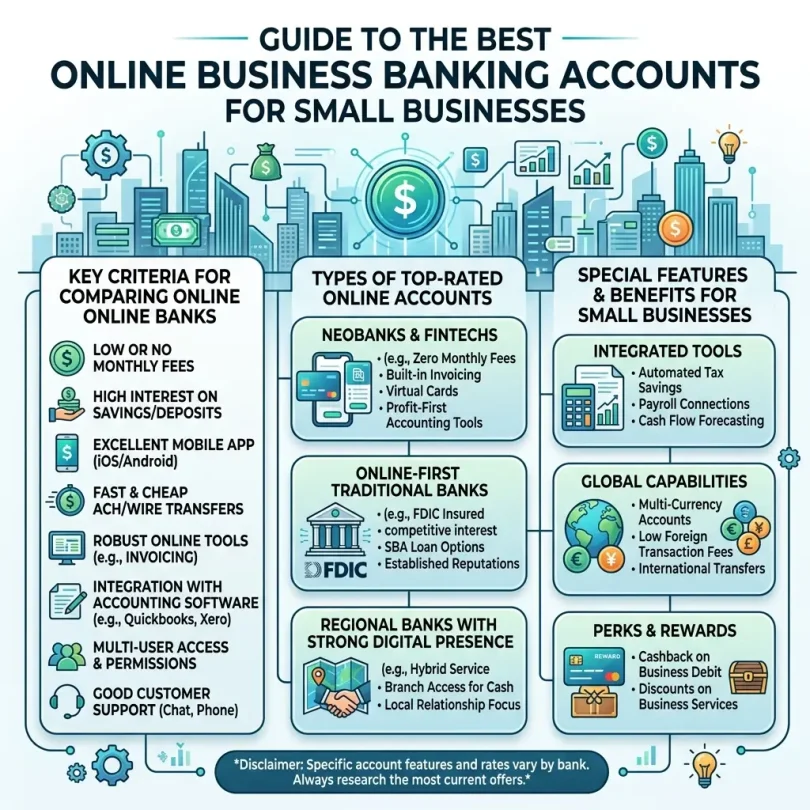
The best online business banking account should offer low fees, easy transfers, strong security, useful integrations, clear deposit rules, reliable customer support, and tools that save time.
But not every account is right for every business.
A freelancer may need simple no-fee checking. An e-commerce seller may need fast payment processor connections. A remote agency may need multiple cards and team permissions. A startup may need higher transfer limits and accounting integrations. A cash-heavy local business may still need a traditional bank with branch access.
This guide compares the best online business banking accounts for small businesses, explains what features matter, and gives a practical checklist before opening an account.
Important Disclaimer
This article is for general informational purposes only. It is not banking, legal, tax, investment, accounting, cybersecurity, or professional advice.
Online business banking products, fees, APYs, transfer limits, account rules, eligibility, payment features, deposit insurance, integrations, and security tools can change. Always verify details directly with the bank or provider before opening an account or using any service.
What Is an Online Business Banking Account?
An online business banking account is a business account that can be managed mainly through a website or mobile app.
It may be offered by:
- A traditional bank
- An online bank
- A credit union
- A banking technology company working with partner banks
- A business payment platform
- A startup-focused banking platform
Online business banking accounts may include:
- Business checking
- Business savings
- Debit cards
- Virtual cards
- ACH transfers
- Wire transfers
- Mobile check deposit
- Bill pay
- Invoicing
- Payment links
- Sub-accounts
- Team permissions
- Accounting integrations
- Payroll connections
- Tax-ready reports
- Payment processor connections
- Expense tracking
- Fraud alerts
- FDIC or NCUA coverage, depending on provider structure
The main goal is to help businesses manage money more clearly and professionally.
Why Small Businesses Need a Separate Business Account
A separate business account helps keep business and personal money apart.
This is important for:
- Cleaner bookkeeping
- Easier tax preparation
- Professional payments
- Vendor payments
- Customer payments
- Business records
- Legal separation, depending on business structure
- Loan applications
- Cash flow tracking
- Payment processor setup
- Better decision-making
Mixing personal and business money can create confusion. It can make it harder to know whether the business is profitable, which expenses belong to the business, and what records are needed later.
Even a sole proprietor can benefit from a separate business account.
Online Business Banking vs Traditional Business Banking
Both options can work. The right choice depends on how your business operates.
Online Business Banking
Online business banking is best for:
- Freelancers
- Online sellers
- Remote businesses
- Consultants
- Agencies
- Digital product sellers
- SaaS startups
- Service businesses
- Small teams
- Creators
- Businesses that rarely use cash
Common benefits:
- Lower monthly fees
- Faster online setup
- Better app experience
- Easy integrations
- Virtual cards
- Invoicing tools
- Sub-accounts
- Remote-friendly access
- No branch visits
Possible limitations:
- Cash deposits may be difficult
- Some accounts have wire limits
- Customer support may be online only
- No local branch relationship
- Some providers are technology companies, not banks directly
Traditional Business Banking
Traditional business banking is best for:
- Cash-heavy businesses
- Restaurants
- Retail stores
- Local service providers
- Businesses needing branch access
- Companies needing in-person support
- Businesses handling frequent cash deposits
- Businesses wanting local banker relationships
Common benefits:
- Branch access
- Cash deposits
- In-person help
- Local business support
- Business lending relationship
- Wire support
- Merchant services
Possible limitations:
- Monthly fees
- Balance requirements
- Transaction limits
- Slower digital tools
- More paperwork
- Less flexible software connections
Many businesses use both: an online business account for daily operations and a traditional bank for cash deposits or local needs.
Best Online Business Banking Accounts for Small Businesses
Below are strong online business banking accounts to compare. Availability, features, pricing, limits, and eligibility can change, so always check official provider pages before opening.
1. Bluevine Business Checking
Best for: Small businesses wanting high-yield business checking
Good for: Service businesses, online businesses, consultants, agencies, freelancers
Main strength: No monthly fee standard plan and interest opportunity on eligible balances
Bluevine Business Checking is a popular online business banking account for small businesses that want low fees and strong digital tools.
Bluevine is known for offering a business checking account with no monthly fees on its standard plan, unlimited transactions, free standard ACH, and interest on eligible balances when activity requirements are met.
Key Features
- Online business checking
- No monthly fee on standard plan
- No minimum balance requirement on standard plan
- Unlimited transactions
- Free standard ACH
- Incoming wire support
- Business debit card
- Sub-accounts
- Mobile check deposit
- Bill pay
- Payment tools
- Accounting software integrations
- High-yield opportunity on eligible balances
- FDIC coverage through partner bank and program bank structure
Why Bluevine Is Good
Bluevine is one of the strongest online business checking options for small businesses that want to avoid monthly maintenance fees.
It is especially useful for businesses that keep steady cash in the account and want the possibility of earning interest on checking balances.
Bluevine also works well for businesses that do not need physical branch access.
Best Fit
Bluevine may fit:
- Freelancers
- Consultants
- Service businesses
- E-commerce sellers
- Digital businesses
- Agencies
- Online business owners
- Small teams
- Businesses that want no monthly fee
- Businesses that want sub-accounts
Possible Downsides
Bluevine may not be ideal for cash-heavy businesses that need frequent branch deposits. The best APY may require qualifying activity or paid plans, so users should check current requirements carefully.
2. Novo Business Checking
Best for: Freelancers, creators, consultants and simple online businesses
Good for: One-person businesses, online sellers, service providers
Main strength: Simple no-fee business banking with invoicing and integrations
Novo is an online business banking platform built for small business owners.
Novo is popular with freelancers, consultants, creators, online sellers, and small service businesses because it focuses on simplicity, no hidden monthly fees, invoicing, budgeting, and integrations with common tools.
Key Features
- Online business checking
- No monthly fee
- No required minimum balance
- Debit card
- Virtual card options
- Invoicing tools
- Reserves for budgeting
- ATM fee reimbursement up to a monthly limit
- Mobile check deposit
- Integrations with business tools
- Payment processor connections
- Expense categorization
- App-based business banking
Why Novo Is Good
Novo is very beginner-friendly. It is good for small business owners who do not want complicated account rules.
The built-in invoicing and business tool connections make it especially useful for freelancers and service providers.
Best Fit
Novo may fit:
- Freelancers
- Consultants
- Coaches
- Creators
- Small agencies
- Online service providers
- Digital product sellers
- E-commerce sellers
- One-person businesses
- Businesses that want simple invoicing
Possible Downsides
Novo may not be ideal for cash-heavy businesses because cash deposit options are limited. Some businesses may also need stronger wire support, higher transfer limits, or more advanced team permissions.
3. Mercury Business Banking
Best for: Startups, tech companies and remote teams
Good for: Software startups, funded companies, online teams, founders
Main strength: Startup-friendly online banking with team tools and integrations
Mercury is a business banking platform commonly used by startups and online companies.
It is designed for modern businesses that need clean digital banking, team access, virtual cards, software integrations, and online payment workflows.
Key Features
- Business checking
- Business savings-style account options
- No monthly fee on standard account use
- No account minimums
- No overdraft fees
- Virtual cards
- Physical debit cards
- Team permissions
- Invoice creation
- Bill pay
- ACH transfers
- Wire transfers
- QuickBooks integration
- Xero integration
- NetSuite integration
- API access
- Startup-friendly tools
- FDIC coverage through partner banks and sweep network structure, depending on account setup
Why Mercury Is Good
Mercury is strong for startups and online businesses that want a polished platform with modern tools.
It works especially well for founders who want virtual cards, employee access, software integrations, and simple online account management.
Best Fit
Mercury may fit:
- Startups
- SaaS companies
- Remote teams
- Agencies
- Online businesses
- Founders
- Tech companies
- Businesses needing team access
- Companies using QuickBooks, Xero or NetSuite
Possible Downsides
Mercury is not a traditional bank itself. It works with partner banks. Businesses should understand the provider structure, FDIC coverage, transfer rules, account eligibility, and support model before opening.
Mercury may also be less ideal for cash-heavy businesses.
4. Relay Business Banking
Best for: Businesses needing organized accounts and team controls
Good for: Bookkeeping-focused businesses, agencies, small teams, Profit First users
Main strength: Multiple accounts and clear cash flow organization
Relay is an online business banking platform designed around account organization, team access, and business cash flow management.
It is popular with business owners who want to separate money into different buckets, such as operating expenses, tax savings, payroll, owner pay, vendor payments, and profit.
Key Features
- Online business checking
- Multiple checking accounts
- Team permissions
- Debit cards
- Virtual cards
- ACH payments
- Wire payments
- Bill pay
- Bookkeeper access
- Accountant access
- QuickBooks integration
- Xero integration
- Cash flow organization
- User permission controls
Why Relay Is Good
Relay is useful for businesses that want better money organization. Instead of keeping all business cash in one account, owners can divide funds into separate accounts for different goals.
This can be helpful for small teams, agencies, and businesses using cash flow systems.
Best Fit
Relay may fit:
- Small teams
- Agencies
- Bookkeeping-focused businesses
- Profit First users
- Businesses with multiple expense categories
- Businesses needing accountant access
- Remote companies
- Owners who want cleaner cash flow
Possible Downsides
Relay may not be the best fit for businesses that want interest on checking balances or branch access. Users should compare plan features and fees before opening.
5. Axos Bank Business Checking
Best for: Online business checking from a bank
Good for: New businesses, small businesses, online banking users
Main strength: Online business accounts from a bank with low-fee options
Axos Bank offers business checking accounts that can be opened online. It is a bank, not only a banking technology platform.
Axos offers business banking products with low fees, online access, and account options for different business needs.
Key Features
- Business checking
- Basic Business Checking option
- No monthly maintenance fee on some accounts
- No minimum balance requirement on some accounts
- Online account opening
- Debit card
- Online banking
- Mobile banking
- Incoming wire support
- Business savings options
- FDIC-insured bank
Why Axos Bank Is Good
Axos is a strong option for business owners who want online banking but prefer to work directly with a bank rather than a fintech platform.
It can be useful for new businesses that want simple online checking with low fees.
Best Fit
Axos may fit:
- New businesses
- Small business owners
- Online banking users
- Businesses wanting a bank account directly
- Owners who want low monthly fees
- Businesses that do not need branch access
Possible Downsides
Axos may not have the same modern startup tools as Mercury or the same simple freelancer integrations as Novo. Users should compare software connections and transfer limits.
6. Grasshopper Business Checking
Best for: Digital business checking with cashback and interest features
Good for: Small businesses, startups, online business owners
Main strength: Online business checking with modern features
Grasshopper is a digital bank serving small businesses, startups, and entrepreneurs. It offers online business checking with digital tools.
Key Features
- Online business checking
- Debit card
- Mobile banking
- Interest opportunity on eligible balances, depending on account terms
- Cashback opportunity, depending on debit use and terms
- Digital account tools
- No branch requirement
- Business support
- FDIC-insured bank
Why Grasshopper Is Good
Grasshopper may be useful for business owners who want an online banking experience with modern features, debit rewards, and simple business account management.
Best Fit
Grasshopper may fit:
- Small businesses
- Startups
- Online sellers
- Entrepreneurs
- Service businesses
- Businesses wanting debit card rewards
- Digital-first owners
Possible Downsides
Users should check account requirements, APY terms, debit rewards rules, and transfer limits before opening.
7. Lili Business Banking
Best for: Freelancers and solo business owners
Good for: Independent contractors, creators, gig workers, consultants
Main strength: Freelancer-friendly tools and tax organization
Lili is a business banking platform designed for freelancers and small business owners. It focuses on simple banking, expense tracking, tax tools, and business organization.
Key Features
- Business checking
- Mobile app
- Debit card
- Expense categorization
- Tax bucket tools
- Invoicing
- Direct deposit
- Reports
- Business tools for freelancers
- Paid plan options with extra features
- Partner bank structure
Why Lili Is Good
Lili is useful for solo business owners who want banking and simple money organization in one app.
It can help freelancers separate tax savings, track expenses, and manage business income without a complicated setup.
Best Fit
Lili may fit:
- Freelancers
- Gig workers
- Consultants
- Independent contractors
- Creators
- Coaches
- Solo business owners
- Side business owners
Possible Downsides
Lili may not be ideal for larger teams, complex businesses, or companies needing advanced wire, payroll, or multi-user controls.
8. Chase Business Complete Banking
Best for: Businesses needing branch access plus online tools
Good for: Local businesses, cash deposit users, growing small businesses
Main strength: Large branch network and full-service business banking
Chase Business Complete Banking is a traditional business checking account with online and mobile access. It is not online-only, but it is important to compare because many small businesses still need branch access.
Key Features
- Business checking
- Branch access
- Cash deposits
- Debit card
- Online banking
- Mobile banking
- Zelle, where available
- QuickAccept payment tools, depending on setup
- Business credit card ecosystem
- Business lending relationship
- Wire transfers
- Bill pay
- Fraud monitoring tools
Why Chase Is Good
Chase may be better than online-only options for businesses that handle cash, want branch support, or need a wider banking relationship.
For local businesses, restaurants, retail shops, and service companies, branch access can matter.
Best Fit
Chase may fit:
- Cash deposit businesses
- Local stores
- Restaurants
- Service businesses
- Growing companies
- Businesses wanting branch support
- Businesses wanting a traditional banking relationship
- Owners who want online tools plus physical locations
Possible Downsides
Monthly fees may apply unless waiver requirements are met. Businesses should read fee schedules carefully.
9. Bank of America Business Advantage Banking
Best for: Businesses wanting large-bank features and branch access
Good for: Local businesses, established small businesses, branch users
Main strength: Large bank access, business tools and account upgrade paths
Bank of America offers business checking accounts with online and branch access. It is a large-bank option for business owners who want digital tools but also need in-person support.
Key Features
- Business checking
- Branch access
- Online banking
- Mobile banking
- Cash deposits
- Debit card
- Business credit products
- Merchant services connections
- Bill pay
- Wire transfers
- Account alerts
- Business Advantage tools
- Monthly fee waiver options, depending on account activity
Why Bank of America Is Good
Bank of America may be useful for businesses that want a full-service business bank with online tools, branch access, and business relationship options.
It can be a better fit for companies that are not fully online.
Best Fit
Bank of America may fit:
- Local businesses
- Established small businesses
- Branch users
- Cash deposit businesses
- Businesses wanting large-bank support
- Owners who want account upgrade paths
Possible Downsides
Monthly fees and waiver requirements must be reviewed. Online-only business owners may find lower-fee options elsewhere.
10. Capital One Business Banking
Best for: Businesses wanting digital tools with a known bank brand
Good for: Small businesses, local users, online banking users
Main strength: Digital banking plus large-bank familiarity
Capital One offers business banking products in some markets and can be a good fit for business owners who want a mix of digital access and known-brand comfort.
Key Features
- Business checking
- Online banking
- Mobile banking
- Debit card
- Branch/café access in some regions
- Cash deposit options, depending on account
- Bill pay
- Transfers
- Business services
- FDIC-insured bank
Why Capital One Business Banking Is Good
Capital One may fit business owners who want online banking but also prefer a familiar large bank. It can be useful if services are available in the business owner’s region.
Best Fit
Capital One may fit:
- Small businesses
- Local business owners
- Online banking users
- Owners wanting a known bank
- Businesses needing some physical access
- Businesses wanting simple digital tools
Possible Downsides
Business account availability can depend on location. Users should check whether business banking products are available in their area.
Quick Comparison Table
| Business Account | Best For | Main Strength | Best User Type |
|---|---|---|---|
| Bluevine | High-yield business checking | No monthly fee standard plan and APY opportunity | Online businesses |
| Novo | Freelancers and simple businesses | Invoicing and integrations | Solo owners |
| Mercury | Startups and tech teams | Virtual cards and team tools | Founders |
| Relay | Cash flow organization | Multiple accounts and permissions | Small teams |
| Axos Bank | Online bank account | Low-fee bank account options | New businesses |
| Grasshopper | Digital business checking | Rewards and online tools | Entrepreneurs |
| Lili | Freelancers | Tax and expense tools | Solo workers |
| Chase | Branch plus online tools | Cash deposits and branch support | Local businesses |
| Bank of America | Large-bank business tools | Branch access and upgrade paths | Established businesses |
| Capital One | Known bank brand | Digital access and physical support in some areas | Small businesses |
How to Choose the Best Online Business Banking Account
1. Check Monthly Fees
Monthly fees can reduce business cash flow.
Look for:
- No monthly maintenance fee
- Easy fee waiver rules
- No minimum balance requirement
- No opening deposit requirement
- No overdraft fee
- No hidden platform fee
- Clear wire and ACH fees
For a new business, no monthly fee is often best.
2. Check ACH and Wire Transfer Rules
Small businesses often need to send and receive payments.
Check:
- Free ACH transfers
- Same-day ACH availability
- Domestic wire fees
- International wire fees
- Incoming wire fees
- Transfer limits
- Payment approval rules
- Vendor payment tools
- Bill pay options
If your business pays vendors or contractors often, transfer rules matter.
3. Check Cash Deposit Options
Online accounts may be weak for cash deposits.
If you receive cash, compare:
- Cash deposit locations
- Cash deposit fees
- Deposit limits
- Branch access
- ATM deposit support
- Partner retail deposit options
Cash-heavy businesses should not choose a fully online account without checking this.
4. Check Payment Processor Integrations
Online businesses may need connections to:
- Stripe
- PayPal
- Square
- Shopify
- Amazon
- Etsy
- eBay
- WooCommerce
- QuickBooks Payments
- Wise
- Gusto
Good integrations can save hours of manual work.
5. Check Accounting Integrations
Look for integration with:
- QuickBooks
- Xero
- FreshBooks
- Wave
- NetSuite
- Zoho Books
- Sage
Accounting integration helps keep records cleaner.
6. Check Invoicing Tools
If you send invoices, built-in invoicing is useful.
Look for:
- Invoice templates
- Payment links
- Automatic reminders
- Recurring invoices
- Customer records
- Invoice tracking
- Payment status
- Exportable reports
Novo, Mercury, and some other platforms offer useful invoice-related tools.
7. Check Team Access
If more than one person helps manage money, team controls matter.
Look for:
- Admin role
- Bookkeeper access
- Accountant access
- Employee cards
- Spending limits
- Approval rules
- View-only access
- Card controls
- Audit logs
Never give everyone full admin access.
8. Check Debit and Virtual Cards
Cards help manage spending.
Look for:
- Physical debit card
- Virtual cards
- Employee cards
- Spending limits
- Card lock/unlock
- Merchant restrictions
- Replacement card rules
- Cashback or rewards, if available
Virtual cards are useful for software subscriptions and online purchases.
9. Check Deposit Insurance
For banks, look for FDIC insurance. For credit unions, look for NCUA insurance.
For fintech platforms, read carefully. Many are not banks themselves but work with partner banks.
Check:
- Which bank holds deposits
- Whether deposits are eligible for FDIC coverage
- Whether sweep network coverage applies
- What limits apply
- Whether coverage protects against bank failure only
- Whether the provider itself is a bank or not
Do not assume every app is a bank.
10. Check Fraud Protection
Business accounts need strong security.
Look for:
- Two-factor authentication
- Login alerts
- Transfer alerts
- Debit card lock
- Wire approval controls
- User permissions
- Device management
- Fraud monitoring
- Positive Pay, where available
- Check fraud controls
- Account activity alerts
Business account fraud can be costly, so security matters from day one.
Best Online Business Banking Account by Business Type
Best for Freelancers
Good options:
- Novo
- Lili
- Bluevine
- Found-style freelancer banking platforms
- Relay, if you want account buckets
Freelancers should prioritize no monthly fees, invoicing, expense tracking, tax buckets, and simple transfers.
Best for Consultants
Good options:
- Novo
- Bluevine
- Relay
- Mercury
- Axos
Consultants usually need invoicing, ACH payments, low fees, and clean bookkeeping.
Best for E-Commerce Sellers
Good options:
- Novo
- Bluevine
- Mercury
- Relay
- Chase, if cash or branch access matters
E-commerce sellers should check integrations with Shopify, Amazon, Etsy, eBay, Stripe, PayPal, and WooCommerce.
Best for Startups
Good options:
- Mercury
- Relay
- Bluevine
- Chase
- Bank of America
Startups often need team access, virtual cards, wire transfers, accounting integrations, and higher limits.
Best for Agencies
Good options:
- Relay
- Mercury
- Bluevine
- Novo
- Axos
Agencies need cash flow organization, client payment tracking, contractor payments, and accounting integration.
Best for Local Businesses
Good options:
- Chase
- Bank of America
- Capital One
- Local credit union
- Online account as secondary account
Local businesses may need cash deposits, branch access, and in-person support.
Best for Remote Teams
Good options:
- Mercury
- Relay
- Bluevine
- Novo
Remote teams need user permissions, virtual cards, online bill pay, and strong account controls.
Online Business Banking Security Tips
Use Strong Passwords
Use a unique password for every business banking account. Never reuse passwords from email, social media, or personal accounts.
Enable Two-Factor Authentication
Always enable two-factor authentication. Use an authenticator app or hardware security key if available.
Protect the Business Email
Your business email is often used for password resets, bank alerts, invoices, payment processor accounts, and tax tools.
Secure it carefully.
Use Role-Based Access
Do not give full account control to every employee or contractor.
Use limited roles for bookkeepers, accountants, and team members.
Turn On Transaction Alerts
Set alerts for:
- Incoming payments
- Outgoing transfers
- Wire activity
- ACH activity
- Debit card purchases
- Failed login attempts
- New device login
- Password changes
Use Separate Cards for Subscriptions
Virtual cards can help isolate risk. Use one card for software subscriptions and another for general spending.
Review Account Activity Weekly
Small businesses should review bank activity at least weekly.
Avoid Public Wi-Fi
Do not log in to business banking from public Wi-Fi unless using a trusted secure connection.
Train Team Members
Teach employees and contractors about phishing, fake invoices, payment redirection scams, and suspicious links.
Verify Vendor Payment Changes
If a vendor asks to change payment details, verify through a trusted phone number or known contact.
Common Online Business Banking Mistakes
Mistake 1: Using a Personal Account for Business
This creates messy records and can cause problems later.
Mistake 2: Choosing Only Based on No Monthly Fee
No fee is good, but transfer limits, support, integrations, and cash deposit rules also matter.
Mistake 3: Ignoring Cash Deposit Needs
If your business handles cash, online-only banking may not be enough.
Mistake 4: Not Checking Wire Fees
Wire fees can be expensive for businesses that send or receive frequent wires.
Mistake 5: Not Setting User Permissions
Too much access creates internal risk.
Mistake 6: Not Connecting Accounting Software
Manual bookkeeping takes more time and creates errors.
Mistake 7: Ignoring Payment Processor Timing
Stripe, PayPal, and marketplace payouts can take time. Choose an account that handles payment flows well.
Mistake 8: Not Saving Bank Statements
Download and store statements every month.
Mistake 9: Not Reviewing Deposit Insurance
Understand whether your provider is a bank or works with partner banks.
Mistake 10: Opening Too Many Accounts Too Soon
Start simple. Add accounts when your business needs them.
Business Banking Account Opening Checklist
Before opening, check:
- Is the account for your business type?
- Is there a monthly fee?
- Can the fee be waived?
- Is there a minimum opening deposit?
- Is there a minimum balance?
- Are ACH transfers free?
- What are wire fees?
- Are incoming wires free?
- Can you deposit checks?
- Can you deposit cash?
- Is there mobile check deposit?
- Are there transfer limits?
- Does it connect with accounting software?
- Does it connect with payment processors?
- Does it offer invoicing?
- Does it offer sub-accounts?
- Does it offer virtual cards?
- Can you add team members?
- Are there user permissions?
- Is there FDIC or NCUA coverage?
- Is the provider a bank or fintech?
- Is customer support reliable?
- Is two-factor authentication available?
Documents Needed to Open a Business Bank Account
Requirements vary, but you may need:
- Business name
- Owner name
- Date of birth
- Address
- Phone number
- Social Security Number or tax ID
- EIN, if applicable
- Business formation documents
- Articles of organization or incorporation
- Operating agreement, if applicable
- Business license, if applicable
- DBA certificate, if applicable
- Ownership information
- Website or business description
- Expected transaction activity
- Government ID
Sole proprietors may need fewer documents than LLCs or corporations.
Best Setup for Small Businesses
A practical setup may look like this:
Freelancer Setup
- Novo or Lili for main business checking
- Separate tax savings bucket
- Accounting tool connection
- Invoice system
- Debit card alerts
Online Store Setup
- Bluevine or Novo for main account
- Payment processor connection
- Separate account for taxes
- Separate account for inventory
- Weekly payout review
Startup Setup
- Mercury for startup banking
- Virtual cards for team spending
- Accounting integration
- Wire transfer controls
- Founder/admin permission rules
Agency Setup
- Relay for multiple accounts
- Account buckets for payroll, taxes and expenses
- Bookkeeper access
- Client payment tracking
- Contractor payment workflow
Local Business Setup
- Chase, Bank of America, Capital One or local credit union for branch access
- Online account for digital operations
- Cash deposit process
- Fraud alerts
- Merchant services connection
Final Verdict: What Are the Best Online Business Banking Accounts?
The best online business banking account depends on business type.
For most small businesses:
- Best high-yield business checking: Bluevine
- Best for freelancers and simple online businesses: Novo
- Best for startups and remote teams: Mercury
- Best for cash flow organization: Relay
- Best online bank account option: Axos Bank
- Best digital bank for entrepreneurs: Grasshopper
- Best for solo business owners: Lili
- Best for branch access: Chase Business Complete Banking
- Best large-bank alternative: Bank of America Business Advantage Banking
- Best known-brand digital option: Capital One Business Banking
If you are a freelancer, start with Novo, Lili, or Bluevine. If you are a startup, compare Mercury and Relay. If you run a local business with cash deposits, compare Chase, Bank of America, Capital One, or a local credit union. If your business keeps steady cash in the account, Bluevine may be worth comparing because of its interest opportunity.
The best business banking account is not always the one with the most features. It is the one that fits your real payment flow, keeps fees low, protects your account, connects with your tools, and makes business records easier.
FAQs About Online Business Banking Accounts
What is the best online business banking account?
The best online business banking account depends on your business type. Bluevine is strong for high-yield checking, Novo is good for freelancers, Mercury is strong for startups, Relay is useful for organized cash flow, and Axos is a strong online bank option.
Can I open a business bank account online?
Yes. Many banks and business banking platforms allow online applications. You may need business documents, owner details, tax ID, and identity verification.
Do I need a business bank account?
A separate business account is strongly recommended because it helps separate personal and business money, organize records, and make tax preparation easier.
Which business banking account has no monthly fee?
Bluevine, Novo, Mercury, Axos Basic Business Checking, and some other online options may offer no monthly fee accounts. Always check current terms before opening.
Which online business account is best for freelancers?
Novo, Lili, and Bluevine are good options for freelancers because they offer simple online access, low fees, invoicing or budgeting tools, and business-friendly features.
Which online business banking account is best for startups?
Mercury is a strong startup option because it offers virtual cards, team tools, integrations, and startup-friendly online banking. Relay and Bluevine are also worth comparing.
Can online business banks accept cash deposits?
Some can, but many online-only accounts have limited cash deposit options. Cash-heavy businesses should compare traditional banks or local credit unions.
Are online business banking accounts FDIC insured?
Many are, but provider structure matters. Some platforms are fintech companies that work with partner banks. Always verify which bank holds deposits and what insurance coverage applies.
What is the difference between a bank and a fintech banking platform?
A bank is a regulated depository institution. A fintech banking platform may provide digital banking services through partner banks. Users should read provider disclosures carefully.
Can I connect online business banking to QuickBooks?
Many online business banking platforms offer QuickBooks integrations. Mercury, Relay, Novo, Bluevine, and others may support accounting connections depending on current features.
What should I look for in a business bank account?
Look for low fees, transfer limits, ACH and wire rules, customer support, deposit insurance, cash deposit options, accounting integrations, invoicing, debit cards, team access, and fraud controls.
Is online business banking safe?
Online business banking can be safe when you use strong passwords, two-factor authentication, transaction alerts, user permissions, secure email, and official apps only.