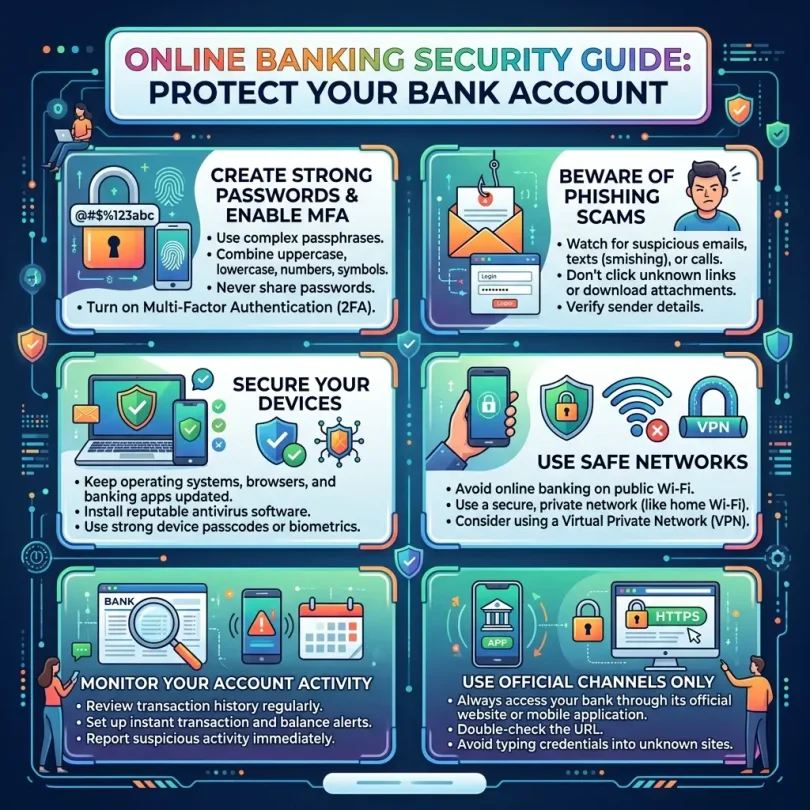

Online banking is convenient, fast, and useful. You can check your balance, pay bills, transfer money, deposit checks, lock your debit card, receive alerts, and manage your account without visiting a branch.
But convenience also brings risk.
Scammers, hackers, fake bank callers, phishing emails, malicious links, payment app scams, SIM-swap attacks, fake support agents, malware, and stolen passwords can all put your bank account at risk.
Online banking security is now more important than ever because fraud continues to grow. The Federal Trade Commission reported that people lost $3.5 billion to imposter scams in 2025, with losses increasing nearly three times since 2020. Imposter scams are especially dangerous because scammers pretend to be trusted people or organizations, including banks, government agencies, businesses, tech support, delivery companies, and fraud departments.
The good news is that many account takeovers and online banking scams can be prevented with better habits.
You do not need to be a cybersecurity expert. You need a strong security setup, careful behavior, and fast response when something looks wrong.
This guide explains how to protect your bank account, avoid common online banking scams, secure your phone and email, use two-factor authentication, recognize phishing, protect mobile banking apps, and respond quickly if your account is compromised.
Important Disclaimer
This article is for general informational purposes only. It is not banking, legal, tax, investment, accounting, cybersecurity, or professional advice.
Online banking products, fraud policies, account protections, transfer rules, payment app terms, dispute deadlines, security features, and refund rights can vary by bank, provider, country, and transaction type. Always verify details directly with your bank or qualified professional before making decisions or responding to account issues.
What Is Online Banking Security?
Online banking security means protecting your bank account, login details, personal information, devices, payment methods, and transfers from unauthorized access or fraud.
It includes:
- Strong passwords
- Two-factor authentication
- Secure email
- Fraud alerts
- Mobile app safety
- Device protection
- Safe Wi-Fi habits
- Phishing awareness
- Debit card controls
- Transaction monitoring
- Secure payment behavior
- Account recovery protection
- Fast reporting of suspicious activity
Your bank has security systems, but you also have responsibilities. A bank may monitor fraud, encrypt sessions, verify devices, and send alerts. But if you share your password, approve a scam transfer, click a fake link, or give a one-time code to a scammer, your account can still be at risk.
Why Online Banking Security Matters
Bank accounts are attractive targets because they connect directly to money.
A scammer may try to:
- Steal your login details
- Reset your password
- Take over your email
- Add a new device
- Change your phone number
- Transfer money
- Send Zelle or payment app payments
- Create fake checks
- Open accounts in your name
- Use your debit card
- Trick you into moving money
- Ask for one-time security codes
- Install remote-access software
- Pretend to be your bank’s fraud department
Many scams do not start with a technical hack. They start with trust.
A scammer may call and say:
“Your account is compromised. Move your money now.”
Or:
“We are from your bank. Tell us the code we just sent.”
Or:
“Your debit card was used. Click this link to verify.”
These scams work because they create panic.
The FTC warns that scammers may impersonate trusted organizations and that the FTC itself will never threaten people, tell them to transfer money to “protect it,” or tell them to withdraw cash or buy gold. The same rule applies to bank scams: a real bank should not pressure you to move money to a “safe account.”
1. Use a Strong Unique Password for Online Banking
Your bank password should be different from every other password you use.
Do not reuse passwords from:
- Social media
- Shopping websites
- Streaming accounts
- Work accounts
- Old forums
- Payment apps
- Cloud storage
If a reused password leaks from another website, scammers may try it on your bank account.
The FDIC recommends using strong and unique passphrases or passwords for each online account and says unique passwords help isolate unauthorized access if one account is breached.
Good Password Rules
Use a password that is:
- Long
- Unique
- Hard to guess
- Not based on your name
- Not based on your birthdate
- Not reused anywhere
- Not stored in plain text
- Not shared with anyone
A strong passphrase can be easier to remember than a random short password.
Example style:
- Four or five unrelated words
- Mixed with numbers or symbols
- Not a famous quote
- Not personal information
Better Option: Use a Password Manager
A password manager can generate and store strong unique passwords.
Benefits:
- No password reuse
- Strong random passwords
- Secure autofill
- Password health checks
- Breach alerts
- Easy password updates
- Secure notes for non-sensitive details
Do not store your bank password in a notebook near your computer or in a phone note without protection.
2. Enable Two-Factor Authentication
Two-factor authentication adds another layer beyond your password.
The FTC explains that even strong passwords can be vulnerable, and using two-factor authentication adds an extra layer of security because a hacker who steals your password cannot log in without the second factor.
Common two-factor methods include:
- Authenticator app
- Push notification
- Hardware security key
- Passkey
- Email code
- SMS text code
- Phone call verification
Best Options
Stronger options usually include:
- Hardware security key
- Passkey
- Authenticator app
Weaker options include:
- SMS text codes
- Email codes
SMS is better than no second factor, but it can be vulnerable to SIM-swap attacks and phone number theft.
Important Rule
Never share a one-time code with anyone.
Scammers may say:
“Read me the code to verify your identity.”
Do not do it.
If a code was sent to your phone or email, it may be the final step the scammer needs to access your account.
3. Use Passkeys Where Available
Passkeys are a newer sign-in method based on FIDO standards. They can reduce phishing risk because they are tied to the real website or app.
CISA and the FIDO Alliance have promoted phishing-resistant authentication methods such as passkeys as a default feature in software products.
Passkeys may use:
- Face ID
- Fingerprint
- Device PIN
- Hardware key
- Secure device credential
Why Passkeys Help
Passkeys can help protect against fake login pages because the credential is designed to work only with the real website or app.
If your bank supports passkeys, consider using them.
Still Be Careful
Passkeys reduce risk, but they do not protect against every scam. A scammer can still trick you into sending money voluntarily.
4. Secure Your Email Account First
Your email account is often the recovery key for your bank.
If a scammer controls your email, they may reset passwords, hide bank alerts, intercept verification links, and access statements.
Protect your email with:
- Strong unique password
- Two-factor authentication
- Recovery email review
- Recovery phone review
- Login alerts
- Security checkup
- Device review
- Password manager
- Hardware key or passkey, if available
Do not use a weak email password with a strong bank password. Your bank security is only as strong as your recovery email.
5. Turn On Bank Account Alerts
Bank alerts can warn you quickly when something changes.
Turn on alerts for:
- Large withdrawals
- Debit card purchases
- Online purchases
- ATM withdrawals
- Low balance
- New payees
- External transfers
- Wire transfers
- Zelle payments
- Password changes
- New device login
- Failed login attempts
- Address changes
- Phone number changes
- Email changes
- Card-not-present purchases
Alerts should go to your phone and email if possible.
Fast alerts help you act quickly if someone accesses your account.
6. Use Official Bank Apps Only
Download banking apps only from official app stores.
Use:
- Apple App Store
- Google Play Store
- Official bank website links
Avoid:
- Links from emails
- Links from text messages
- Search ads
- Unknown APK files
- Third-party app stores
- Social media links
- Telegram or WhatsApp app files
Fake banking apps can steal login details.
Before installing, check:
- Developer name
- Reviews
- Download count
- App permissions
- Official website confirmation
7. Avoid Public Wi-Fi for Banking
Public Wi-Fi can be risky, especially in:
- Airports
- Hotels
- Cafés
- Shopping malls
- Universities
- Bus stations
- Shared offices
Avoid logging in to banking accounts on public Wi-Fi.
If you must access banking while traveling:
- Use mobile data if possible
- Use a trusted secure connection
- Avoid unknown Wi-Fi networks
- Turn off auto-connect
- Do not accept suspicious certificates
- Do not enter passwords on shared computers
Never use public computers for online banking.
8. Keep Your Phone and Computer Updated
Security updates fix known weaknesses.
Keep updated:
- Phone operating system
- Computer operating system
- Bank app
- Browser
- Password manager
- Antivirus or security software
- Email app
Do not ignore update notifications for months.
Cybercriminals often exploit old software.
9. Lock Your Phone Properly
If your phone is stolen, your banking apps may be exposed.
Use:
- Strong device PIN
- Fingerprint or face unlock
- Auto-lock
- Remote wipe
- Find My Device or Find My iPhone
- SIM PIN, where available
- App lock, if supported
- Bank app biometric lock
Avoid:
- Simple PINs like 1234
- Sharing your phone PIN
- Saving passwords in notes
- Keeping bank screenshots in gallery
- Leaving phone unlocked
Your phone is now a banking device. Treat it like one.
10. Protect Against Phishing
Phishing is when scammers trick users into giving information or clicking malicious links.
The FTC describes phishing scams as messages that look like they come from known sources, but are designed to steal personal information or install malware.
Phishing may arrive through:
- Text message
- Phone call
- Social media
- Fake ads
- Search results
- QR codes
- Fake support chats
- Fake bank websites
Common Bank Phishing Messages
Examples:
- “Your account is locked.”
- “Suspicious login detected.”
- “Verify your debit card.”
- “Your payment failed.”
- “You received a refund.”
- “Your account will be closed.”
- “Click to update your information.”
- “Confirm your identity now.”
- “Your card was charged.”
- “Security alert: call this number.”
How to Stay Safe
Do this:
- Do not click suspicious links
- Open bank app directly
- Type bank website manually
- Use bookmarks
- Call the number on your debit card or official website
- Do not trust caller ID
- Do not share codes
- Do not download attachments
- Do not enter bank details after clicking unknown links
11. Beware of Fake Bank Calls
Scammers can spoof phone numbers. Your phone may show your bank’s name even if the call is fake.
A scammer may say:
- Your account is hacked
- Your card was used
- You must transfer money
- You need to verify a code
- Your account will be closed
- You must install an app
- You must stay on the phone
What to Do
Hang up.
Then call your bank using:
- Number on back of debit card
- Number on official website
- Number inside official bank app
Do not call back a number given by the caller.
12. Never Move Money to a “Safe Account”
This is one of the most dangerous scams.
A scammer may pretend to be bank fraud support and say your account is compromised. Then they tell you to move your money to a “safe account.”
That safe account belongs to the scammer.
Real banks do not ask customers to move money to protect it from fraud.
If someone pressures you to transfer money urgently, stop and call your bank directly.
13. Be Careful With Zelle, Payment Apps and Instant Transfers
Fast payments are useful, but scams can move quickly.
Payment apps and instant bank transfers may be hard to reverse if you authorize the payment.
Use fast payments only with people or businesses you trust.
Avoid sending money because of:
- Fake bank calls
- Fake marketplace sellers
- Fake rental listings
- Fake job offers
- Fake romance partners
- Fake tech support
- Fake government threats
- Fake delivery fees
- Fake prize claims
- Fake family emergencies
If a stranger insists on instant payment, treat it as a warning sign.
14. Use Debit Card Controls
Many banks allow users to control debit cards through the app.
Use features such as:
- Lock card
- Unlock card
- Spending alerts
- ATM withdrawal alerts
- Online purchase alerts
- International transaction controls
- Merchant category limits, if available
- Temporary card freeze
- Replacement card request
If you rarely use your debit card, keep it locked until needed.
15. Review Transactions Regularly
Do not wait for monthly statements.
Check your account at least weekly.
Review:
- Debit card purchases
- ATM withdrawals
- ACH transfers
- Zelle payments
- Bill payments
- Check deposits
- Wire transfers
- Subscription charges
- Unknown micro-deposits
- External account links
- New payees
- Failed login messages
Small unauthorized charges may be tests before larger theft.
16. Protect Your Social Media Information
Scammers use social media to guess security answers and create personalized scams.
The FDIC warns that sharing details like birthdates, pets’ names, family names, locations, addresses, or employment information can give criminals hints needed to guess passwords.
Avoid publicly sharing:
- Full birthday
- Mother’s maiden name
- First school
- Pet names
- Home address
- Phone number
- Travel plans
- Workplace details
- Bank name
- Debit card photos
- Check photos
- Account screenshots
Your online life can be used against your bank account.
17. Do Not Save Bank Details in Unsafe Places
Avoid storing sensitive information in:
- Phone notes
- Unprotected documents
- Screenshots
- Email drafts
- WhatsApp messages
- Cloud storage without protection
- Browser notes
- Shared computers
- Paper near your desk
Do not save:
- Bank password
- Security questions
- Full card number
- PIN
- One-time codes
- Recovery codes
- Account login answers
Use a password manager for passwords, and keep critical recovery information secure.
18. Use Separate Accounts for Safety
A simple account structure can reduce risk.
Example:
- Checking account for daily spending
- Savings account for emergency fund
- Separate account for bills
- Separate account for business, if needed
Do not keep all money in the same debit-card-connected checking account.
If your debit card is compromised, keeping most money in savings can reduce exposure.
19. Be Careful With Linked Accounts
Online banks often let users link external accounts.
Review linked accounts regularly.
Remove accounts you no longer use.
Check:
- External bank links
- Payment app links
- Brokerage links
- Budget app links
- Payroll links
- Subscription links
- Old merchant connections
If an app or service is no longer needed, disconnect it.
20. Watch for Remote Access Scams
A scammer may ask you to install software so they can “help” with a refund, bank issue, tech problem, or fraud alert.
They may use tools that let them see or control your screen.
Never give remote access to someone who contacts you unexpectedly.
Do not install remote access apps for:
- Fake bank support
- Fake Microsoft support
- Fake refund departments
- Fake investment platforms
- Fake government agents
- Fake fraud teams
If you already installed remote access software during a suspicious call, disconnect the internet, uninstall the app, change passwords from a clean device, and contact your bank.
Online Banking Security Checklist
Use this checklist:
- Use strong unique bank password
- Use password manager
- Enable two-factor authentication
- Use passkey if available
- Secure email account
- Turn on bank alerts
- Use official banking app
- Avoid public Wi-Fi
- Keep devices updated
- Lock phone with strong PIN
- Do not share one-time codes
- Do not click bank links in texts
- Call bank directly from official number
- Do not move money to “safe account”
- Use debit card lock
- Review transactions weekly
- Remove old linked accounts
- Protect social media privacy
- Avoid remote access scams
- Report suspicious activity quickly
Common Online Banking Scams
1. Fake Fraud Department Call
A scammer says your account is under attack. They ask for a code or tell you to transfer money.
2. Fake Bank Text
A text says your account is locked. It includes a link to a fake login page.
3. Payment App Scam
A scammer convinces you to send money through instant payment.
4. Fake Check Scam
A scammer sends a check, asks you to deposit it, then asks you to send some money back. Later, the check fails.
5. Remote Access Scam
A scammer asks you to install software and then controls your device.
6. Bank Imposter Scam
A scammer pretends to be your bank and asks for personal information.
7. Card Verification Scam
A scammer asks for card number, CVV, PIN, or one-time code.
8. Job Payment Scam
A fake employer sends money and asks you to transfer funds or buy equipment.
9. Marketplace Scam
A fake buyer or seller tricks you into paying outside the platform.
10. QR Code Scam
A fake QR code leads to a phishing page or payment request.
What to Do If Your Bank Account Is Compromised
Act quickly.
Step 1: Contact Your Bank
Call the official number from your bank app, bank website, debit card, or statement.
Tell them:
- What happened
- When it happened
- Which transactions are suspicious
- Whether you clicked a link
- Whether you shared a code
- Whether you installed software
- Whether your card is missing
Step 2: Change Passwords
Change your bank password from a clean device.
Also change:
- Email password
- Payment app passwords
- Password manager master password if needed
- Any reused passwords
Step 3: Secure Email
Check:
- Forwarding rules
- Recovery phone
- Recovery email
- Logged-in devices
- Recent login activity
- Suspicious filters
- Unknown connected apps
Step 4: Lock Cards
Lock debit cards and request replacement if needed.
Step 5: Review Transactions
Make a list of suspicious transactions.
Include:
- Date
- Amount
- Merchant
- Transfer destination
- Transaction ID
- Screenshots, if needed
Step 6: File Reports
Depending on your country, file reports with:
- Bank fraud department
- Local police, if needed
- FTC at ReportFraud.ftc.gov in the U.S.
- IdentityTheft.gov if identity theft occurred
- Payment app support
- Credit bureaus, if identity risk exists
Step 7: Check Credit Reports
If personal information was stolen, monitor your credit.
Consider fraud alerts or credit freezes where appropriate.
Step 8: Scan Devices
Use trusted security software to check for malware.
If remote access software was installed, remove it.
Step 9: Watch Future Activity
Scammers may try again later.
Keep alerts on and monitor accounts closely.
Online Banking Security for Older Adults
Older adults are often targeted by scammers because they may have savings and may trust official-sounding calls.
Safety tips:
- Do not answer unknown numbers
- Never move money because of a phone call
- Ask a trusted family member before large transfers
- Use bank alerts
- Use two-factor authentication
- Keep bank contact numbers saved
- Do not click text links
- Do not install remote access apps
- Report pressure tactics immediately
Family members can help by setting up alerts and educating older relatives without taking away independence.
Online Banking Security for Small Businesses
Business accounts need extra protection.
Use:
- Separate business account
- Role-based access
- Two-factor authentication for every user
- Wire approval rules
- ACH approval rules
- Positive Pay, if available
- Vendor verification process
- Payment change confirmation
- Bookkeeper view-only access
- Monthly account review
- Secure accounting software
- Fraud insurance review
- Staff scam training
Business email compromise is a major risk. If a vendor suddenly changes payment details by email, verify through a trusted phone number.
Online Banking Security for Freelancers
Freelancers should protect both personal and business accounts.
Use:
- Separate business account
- Separate tax savings account
- Invoice tracking
- Payment app security
- Strong email security
- Bank alerts
- Payment confirmation process
- Client verification
- Avoid overpayment scams
Fake clients may send bad checks or ask for refunds before deposits fully clear.
Best Tools for Online Banking Security
Password Manager
Helps create and store strong passwords.
Authenticator App
Provides one-time codes stronger than password-only login.
Hardware Security Key
Useful for email, password manager, and accounts that support it.
Bank Alerts
Warns about suspicious account activity.
Debit Card Lock
Allows temporary card freeze.
Credit Monitoring
Helps detect identity misuse.
Antivirus or Security Software
Helps detect malware and risky downloads.
Secure Browser
Useful for banking on desktop.
Passkeys
Reduce phishing risk where supported.
Spam Call Blocking
Helps reduce scam calls.
Final Verdict: How to Protect Your Online Bank Account
Online banking security is about layers.
The strongest setup includes:
- Strong unique password
- Password manager
- Two-factor authentication
- Passkeys or hardware keys where available
- Secure email
- Bank alerts
- Official bank app only
- Updated devices
- Debit card controls
- Weekly transaction review
- Phishing awareness
- Fast reporting
Most scams work because they create panic. Do not let urgency control your decisions.
If someone says your money is at risk, stop. Hang up. Open your bank app directly or call the official number. Never share one-time codes. Never move money to a “safe account.” Never install remote access software for an unexpected caller.
The safest online banking users are not lucky. They are prepared, skeptical, and quick to respond.
FAQs About Online Banking Security
What is online banking security?
Online banking security means protecting your bank account, login details, device, email, payment methods, and transfers from fraud, scams, and unauthorized access.
How can I protect my online bank account?
Use a strong unique password, enable two-factor authentication, secure your email, turn on bank alerts, use official apps, avoid public Wi-Fi, keep devices updated, and never share one-time codes.
Is online banking safe?
Online banking can be safe when users choose insured institutions, use strong security settings, avoid scams, and monitor accounts regularly. No system is risk-free.
Should I use two-factor authentication for banking?
Yes. The FTC says two-factor authentication adds another layer of security because a stolen password alone is not enough to log in.
Are SMS codes safe for banking?
SMS codes are better than no two-factor authentication, but they are weaker than authenticator apps, passkeys, or hardware security keys because phone numbers can be targeted.
What is a bank phishing scam?
A bank phishing scam is a fake message, call, or website pretending to be your bank to steal passwords, codes, card details, or personal information.
What should I do if I clicked a fake bank link?
Do not enter more information. Change your password from a clean device, contact your bank directly, secure your email, monitor transactions, and report suspicious activity.
Will my bank ask for my one-time code?
You should never share one-time codes with callers or message senders. Scammers often ask for these codes to access your account.
Can caller ID be faked?
Yes. Scammers can spoof phone numbers and make calls appear to come from your bank. Hang up and call the official number yourself.
What is a safe account scam?
A safe account scam is when someone pretending to be a bank or authority tells you to move money to another account to “protect” it. The receiving account usually belongs to the scammer.
Should I use public Wi-Fi for online banking?
Avoid public Wi-Fi for banking. Use mobile data or a trusted secure connection instead.
What should I do if my bank account is hacked?
Contact your bank immediately, lock cards, change passwords, secure your email, review transactions, file reports, and monitor your credit if personal information was exposed.