
Freelancers and remote workers need banking that works differently from a normal salary account.
A traditional employee may only need one checking account, direct deposit, a debit card, and bill pay. But a freelancer may need to receive payments from international clients, send invoices, separate tax money, pay contractors, manage multiple currencies, withdraw from marketplaces, track business expenses, connect accounting software, and protect accounts from scams.
Remote workers may also need tools for global payments, currency conversion, mobile banking, international transfers, digital cards, and secure app access.
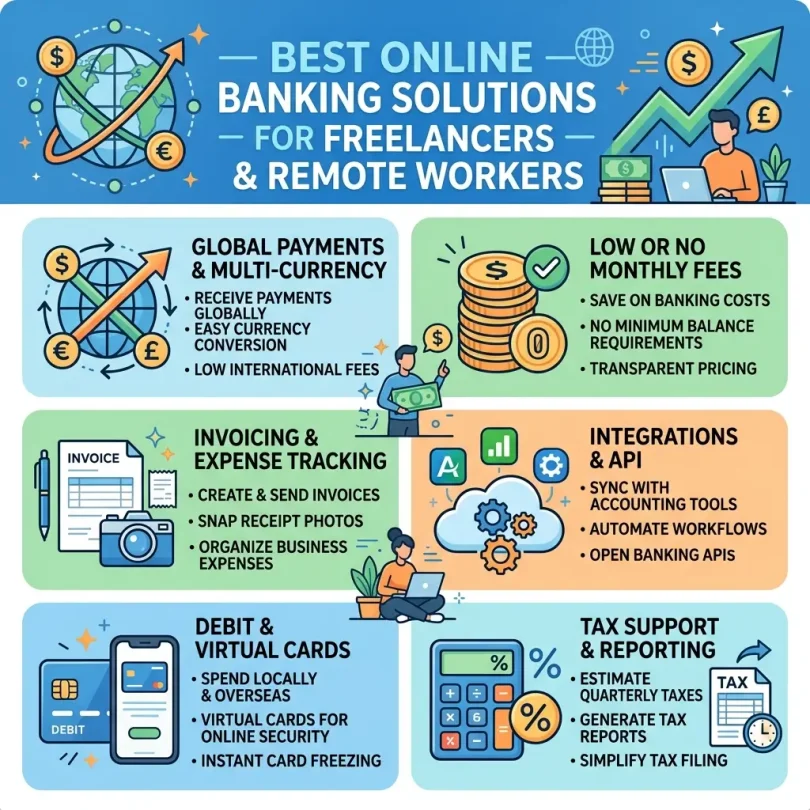
That is why the best online banking solution for freelancers is not always a normal personal bank account. Many freelancers need a mix of:
- Business checking account
- High-yield savings account
- Multi-currency account
- International payment platform
- Invoicing tool
- Tax savings bucket
- Expense tracking
- Debit card
- Virtual cards
- Accounting integration
- Fraud alerts
- Strong login security
For example, Wise Business says users can pay invoices, get paid, manage expenses, and use a one-time setup fee in the U.S., while using the mid-market rate without markups. Payoneer says freelancers can get paid, make payments, access earnings, manage money, connect to freelance marketplaces, and pay business expenses in one place. Bluevine says freelancers may use its business checking for high-yield checking, integrated invoicing, and fee-free banking features.
This guide compares the best online banking solutions for freelancers and remote workers, explains which account types matter, and gives a practical checklist before choosing a provider.
Important Disclaimer
This article is for general informational purposes only. It is not banking, legal, tax, investment, accounting, cybersecurity, payment, or professional advice.
Online banking products, fees, APYs, transfer limits, tax tools, currency conversion fees, deposit insurance, partner-bank structures, account eligibility, business account rules, and payment platform policies can change. Always verify details directly with the bank, credit union, transfer provider, or qualified professional before opening an account or using any service.
Why Freelancers Need Better Online Banking
Freelancers have irregular income, client payment delays, business expenses, tax obligations, and sometimes international payments.
A good online banking setup can help with:
- Separating personal and business money
- Receiving client payments
- Sending invoices
- Tracking expenses
- Saving for taxes
- Managing irregular income
- Paying software subscriptions
- Paying contractors
- Receiving marketplace payouts
- Handling international transfers
- Avoiding unnecessary fees
- Preparing cleaner records
- Reducing fraud risk
If a freelancer uses one personal account for everything, records can become messy quickly.
A separate business or freelancer-focused account helps make income, expenses, taxes, and savings easier to understand.
Freelancer Banking vs Regular Banking
Regular Personal Banking
Personal banking is usually built for:
- Paychecks
- Household bills
- Debit card spending
- Savings
- ATM withdrawals
- Personal transfers
It may be enough for a remote employee who receives salary from one employer.
Freelancer Banking
Freelancer banking needs more tools:
- Client payment tracking
- Business account name
- Invoicing
- Expense categories
- Tax savings
- Accounting exports
- Multi-currency receiving
- International transfer support
- Payment processor connections
- Contractor payments
- Business debit card
- Virtual cards
- Proof of income records
A freelancer is not just receiving money. A freelancer is running a small business.
Do Freelancers Need a Business Bank Account?
In many cases, yes.
A business account can help freelancers:
- Keep business income separate
- Track deductible expenses
- Look more professional
- Receive payments under a business name
- Connect accounting software
- Prepare records for tax filing
- Avoid mixing personal and client money
- Build a business banking history
- Manage cash flow
A sole proprietor may be able to use a separate personal account in some cases, but a business account is usually cleaner. LLCs, corporations, and registered businesses generally need dedicated business accounts.
Always check local rules and speak with a qualified tax or legal professional if unsure.
Best Online Banking Solutions for Freelancers and Remote Workers
Below are strong options to compare. The best choice depends on your country, business type, client location, payment method, tax needs, transfer needs, and account eligibility.
1. Novo Business Banking
Best for: Freelancers who want simple online business banking
Good for: Consultants, creators, coaches, online service providers, small agencies
Main strength: Simple account, invoicing, reserves and integrations
Novo is a popular online business banking platform for freelancers and small business owners. It focuses on simple banking, invoicing, budgeting, and software integrations.
Relay’s 2026 business account guide describes Novo as a strong option for simple, fee-free business checking with no monthly fees or minimum balance, plus invoicing, reserves, and tax-ready reporting features.
Key Features
- Online business checking
- No monthly fee structure
- No minimum balance requirement
- Invoicing tools
- Reserves for budgeting
- Business debit card
- Virtual card features, depending on account
- Mobile check deposit
- Payment processor connections
- Business app integrations
- Expense categorization
- Tax-ready reporting tools
- Banking services through partner bank structure
Why Novo Is Good for Freelancers
Novo is simple and freelancer-friendly. It helps users send invoices, separate money into reserves, connect business tools, and avoid complicated branch-bank rules.
For freelancers who mainly receive online payments and do not handle cash, Novo can be a practical option.
Best Fit
Novo may fit:
- Freelancers
- Consultants
- Creators
- Coaches
- Copywriters
- Designers
- Developers
- Virtual assistants
- Online service providers
- One-person businesses
- Small agencies
Possible Downsides
Novo may not be ideal for freelancers who handle cash often, need branch access, or require advanced wire support. Users should also understand the partner-bank structure.
2. Bluevine Business Checking
Best for: Freelancers who want business checking with APY potential
Good for: Consultants, service businesses, agencies, online businesses
Main strength: Business checking, invoicing and eligible interest opportunity
Bluevine is often compared by freelancers and small business owners because it offers online business checking with digital tools.
Bluevine’s freelancer banking guide says freelancers may choose Bluevine for high-yield checking, integrated invoicing, and fee-free banking. It mentions up to 3.0% APY, subject to terms and qualifying activity. Bluevine’s free business checking guide says a good free business checking account should have no monthly maintenance fee, no minimum balance requirement, ACH transfers, bill pay, invoicing, and mobile banking.
Key Features
- Online business checking
- No monthly fee on standard plan
- No minimum balance on standard plan
- APY opportunity on eligible balances
- Integrated invoicing
- ACH transfers
- Bill pay
- Business debit card
- Sub-accounts
- Mobile banking
- Payment tools
- Accounting integrations
- FDIC coverage through partner bank and program bank structure
Why Bluevine Is Good for Freelancers
Bluevine is strong for freelancers who keep business cash in checking and want it to earn interest where eligible.
It is also useful for service businesses that send invoices and receive client payments.
Best Fit
Bluevine may fit:
- Freelancers with steady client income
- Consultants
- Agencies
- Online businesses
- Service providers
- Contractors
- Business owners wanting sub-accounts
- Users wanting APY opportunity
Possible Downsides
The best APY may require qualifying activity or paid plans. Cash deposits and some advanced features may have limits or fees. Always verify current terms.
3. Lili
Best for: Solo freelancers who want tax and expense tools
Good for: Gig workers, independent contractors, creators, small service providers
Main strength: Freelancer-friendly expense tracking and tax buckets
Lili is designed for freelancers and solo business owners. It focuses on banking, expense tracking, invoicing, tax tools, and simple money organization.
Bluevine’s competitor comparison notes that Lili simplifies banking for freelancers with tax and expense tools, while paid upgrades may apply for extra features.
Key Features
- Freelancer-focused account
- Business debit card
- Expense tracking
- Tax bucket tools
- Invoicing
- Mobile app
- Direct deposit
- Reports
- Paid plan options
- Business organization features
- Partner-bank structure
Why Lili Is Good for Freelancers
Lili is useful for solo freelancers who need help organizing business income and expenses.
Its tax bucket and expense features can help freelancers avoid the common mistake of spending money that should be saved for tax payments.
Best Fit
Lili may fit:
- Solo freelancers
- Gig workers
- Independent contractors
- Part-time freelancers
- Coaches
- Creators
- Small service providers
- People who want simple tax savings tools
Possible Downsides
Some features may require paid plans. Lili may not fit larger teams, businesses needing branch access, or companies requiring advanced business controls.
4. Relay
Best for: Freelancers and remote teams needing cash flow organization
Good for: Agencies, small teams, bookkeeper-managed businesses, Profit First users
Main strength: Multiple accounts and team permissions
Relay is an online business banking platform focused on organization, cash flow, and team controls.
It is popular with business owners who want to separate money into different accounts for taxes, owner pay, operating expenses, profit, contractors, and software.
Relay’s 2026 business account guide highlights online business bank accounts for digital operations and includes tools like permissions, software integrations, and multiple account structures.
Key Features
- Online business banking
- Multiple checking accounts
- Debit cards
- Virtual cards
- Team access
- Bookkeeper permissions
- Accountant access
- ACH transfers
- Wire transfers
- Bill pay
- QuickBooks integration
- Xero integration
- Cash flow organization
- User permissions
Why Relay Is Good for Freelancers and Remote Teams
Relay is useful when a freelancer grows into a small team or agency.
Instead of keeping all money in one account, Relay allows organized cash buckets. This helps with taxes, payroll, owner pay, subcontractors, and expenses.
Best Fit
Relay may fit:
- Agencies
- Remote teams
- Freelancers with subcontractors
- Bookkeeper-managed businesses
- Profit First users
- Consultants with multiple income streams
- Small businesses needing permissions
Possible Downsides
Relay may not be the best fit for a beginner freelancer who only needs simple invoicing and one account. It is more useful when cash flow organization matters.
5. Mercury
Best for: Remote startups, tech freelancers and online businesses
Good for: SaaS founders, remote teams, agencies, tech consultants
Main strength: Startup-style banking, virtual cards, API and integrations
Mercury is a business banking platform often used by startups, founders, online businesses and remote teams.
It supports digital banking workflows, virtual cards, team permissions, accounting integrations, and startup-friendly tools.
Relay’s 2026 comparison describes Mercury as strong for tech startups, while noting that different businesses may need different accounts depending on payment patterns and priorities.
Key Features
- Business checking
- Business savings-style account options
- Virtual cards
- Physical debit cards
- Team permissions
- ACH transfers
- Wire transfers
- Bill pay
- Invoicing
- QuickBooks integration
- Xero integration
- NetSuite integration
- API access
- Startup-style dashboard
- Partner-bank structure
Why Mercury Is Good for Remote Workers and Founders
Mercury is useful for remote businesses that need team access, software integrations, cards for subscriptions, and online management.
It may be more powerful than needed for a beginner freelancer, but very useful for founders, agencies, and online companies.
Best Fit
Mercury may fit:
- Startup founders
- SaaS businesses
- Remote teams
- Tech freelancers
- Agencies
- Online companies
- Businesses needing virtual cards
- Teams needing accounting integrations
Possible Downsides
Mercury is a fintech company, not a bank directly. Users should understand partner-bank disclosures, insurance structure, fees, eligibility, and account limits.
6. Wise Business
Best for: Freelancers receiving international payments
Good for: International freelancers, remote workers, contractors, agencies, digital nomads
Main strength: Multi-currency account and transparent currency conversion
Wise Business is one of the strongest tools for freelancers who work with international clients.
Wise Business says users can pay invoices, get paid, manage expenses, and do business in other currencies. Its U.S. business page says Wise uses the mid-market rate without markups and charges a one-time setup fee in the U.S. Wise’s Hong Kong business page says users can accept payments in USD, EUR, GBP and other major currencies, create invoices, send payment links, or get paid by card.
Key Features
- Multi-currency account
- Local account details in supported currencies
- International transfers
- Mid-market exchange rate
- Transparent conversion fees
- Business debit card, where available
- Invoice payment tools
- Payment links, depending on region
- Batch payments
- Contractor payments
- Expense management
- Supports many countries and currencies
- Business account option
Why Wise Business Is Good for Freelancers
Wise Business is especially useful for freelancers with clients in the U.S., UK, Europe, Australia, Canada or other countries.
Instead of asking clients to send expensive bank wires, freelancers can often receive local-style payments in major currencies, depending on account availability.
Best Fit
Wise Business may fit:
- International freelancers
- Remote workers
- Digital nomads
- Online agencies
- Contractors
- Consultants
- Designers
- Developers
- Writers
- Marketers
- Small businesses with global clients
Possible Downsides
Wise is not a full replacement for every local bank account. Availability, account details, fees, cards, and transfer routes vary by country. Users should also understand that Wise is a money services provider, not the same as a normal local checking account in every region.
7. Payoneer
Best for: Marketplace freelancers and global client payments
Good for: Freelancers, online sellers, agencies, affiliate earners, marketplace workers
Main strength: Marketplace connections and global payment receiving
Payoneer is widely used by freelancers and online sellers to receive global payments.
Payoneer says freelancers can get paid, make payments, access earnings, manage money, connect to freelance marketplaces, and pay business expenses in one place. Payoneer’s pricing page lists fees for certain types of client payments and Payoneer-to-Payoneer payments, so users should review pricing before relying on it.
Payoneer is also especially relevant in countries where freelancers use it to withdraw international marketplace income. Payoneer’s Pakistan-focused content says many freelancers in Pakistan use Payoneer to receive international marketplace and direct client payments, with JazzCash withdrawal support mentioned in its Payoneer/JazzCash guide.
Key Features
- International payment receiving
- Marketplace integrations
- Client payments
- Multi-currency balances
- Payoneer-to-Payoneer payments
- Local bank withdrawal
- Business payments
- Contractor payments
- Debit card options, depending on country
- Global payment service
- Invoice-style payment requests
- Freelancer and seller tools
Why Payoneer Is Good for Freelancers
Payoneer is useful for freelancers who work through marketplaces, receive global payments, or need a payout option supported in their country.
It is also common among online sellers and affiliate marketers.
Best Fit
Payoneer may fit:
- Freelancers on marketplaces
- Remote workers in emerging markets
- Online sellers
- Affiliate marketers
- Agencies
- Consultants
- Contractors
- Pakistani freelancers
- Users needing marketplace payouts
Possible Downsides
Fees can vary by payment type, currency conversion, withdrawal method, and country. Always check the pricing page before receiving large payments.
8. Found
Best for: Freelancers wanting banking plus bookkeeping-style tools
Good for: Solo business owners, contractors, service providers
Main strength: Freelancer banking with business organization features
Found is a freelancer-focused banking platform designed to combine business banking-style tools with expense tracking, invoicing, and tax organization.
It can be useful for solo workers who want simple financial organization without using several separate apps.
Key Features
- Freelancer-focused account
- Expense tracking
- Invoicing
- Tax estimate tools
- Business debit card
- Mobile app
- Income and expense reports
- Tax category support
- Partner-bank structure
- Solo business tools
Why Found Is Good for Freelancers
Found can help freelancers who want one app to handle everyday business money, expenses, and tax preparation support.
It is especially useful for people who struggle to set money aside for taxes.
Best Fit
Found may fit:
- Solo freelancers
- Independent contractors
- Consultants
- Creators
- Gig workers
- Service providers
- People wanting built-in tax tools
Possible Downsides
Found may not be best for larger teams or businesses needing complex permissions, international payment features, or branch access.
9. Axos Business Checking
Best for: Freelancers who want online banking from a bank
Good for: Small business owners, consultants, contractors
Main strength: Digital business accounts from an FDIC-insured bank
Axos Bank offers online business checking accounts. It is an actual bank, not only a fintech platform.
This can appeal to freelancers who want online banking but prefer a direct bank relationship.
Key Features
- Online business checking
- No monthly maintenance fee options
- No minimum balance options
- Debit card
- Online banking
- Mobile banking
- Mobile check deposit
- Incoming wire support
- Business savings options
- FDIC-insured bank
- Business account support
Why Axos Is Good for Freelancers
Axos is useful for freelancers who want low-fee online business banking from a bank.
It may fit contractors and consultants who want simple online business checking without a branch-heavy bank.
Best Fit
Axos may fit:
- Freelancers
- Consultants
- Contractors
- Small business owners
- Online banking users
- People wanting direct bank relationship
- Users who do not need branches
Possible Downsides
Axos may not have the same freelancer-specific tax tools as Lili or Found, or the same international payment tools as Wise and Payoneer.
10. Traditional Bank + Digital Payment Provider Setup
Best for: Freelancers needing both local banking and global payments
Good for: Remote workers, international freelancers, small businesses, cash users
Main strength: Combines stability, local access and global payment tools
Some freelancers should not rely on only one app.
A practical setup may include:
- Local bank account for domestic money
- Online business account for operations
- Wise for international clients
- Payoneer for marketplace payouts
- High-yield savings for tax reserves
- Accounting software for records
This hybrid setup can be stronger than using one provider for everything.
Why Hybrid Setup Is Good
Freelancers often have mixed needs.
Example:
- A Pakistani freelancer may receive marketplace payouts through Payoneer.
- A U.S. consultant may invoice overseas clients through Wise.
- A local service provider may need a traditional bank for cash deposits.
- A remote agency may use Mercury or Relay for team cards and permissions.
- A solo freelancer may use Lili or Found for tax buckets.
Best Fit
Hybrid setup may fit:
- International freelancers
- Freelancers with local and global clients
- Remote workers
- Small agencies
- Marketplace sellers
- Cash users
- People needing backup banking access
Possible Downsides
More accounts mean more management. Use a clear system and review statements monthly.
Quick Comparison Table
| Solution | Best For | Main Strength | Best User Type |
|---|---|---|---|
| Novo | Simple freelancer banking | Invoicing and reserves | Solo freelancers |
| Bluevine | Business checking with APY | Invoicing and interest opportunity | Consultants and agencies |
| Lili | Tax and expense tools | Freelancer-focused organization | Solo workers |
| Relay | Cash flow organization | Multiple accounts and permissions | Agencies and remote teams |
| Mercury | Startup-style banking | Virtual cards and integrations | Founders and tech workers |
| Wise Business | International clients | Multi-currency receiving | Global freelancers |
| Payoneer | Marketplace payouts | Global payment receiving | Marketplace freelancers |
| Found | Banking plus tax tools | Expense and tax organization | Contractors |
| Axos Business | Online bank account | Direct bank relationship | Small business owners |
| Hybrid setup | Complex needs | Local + global tools | International freelancers |
How to Choose Online Banking for Freelancers
1. Decide If You Need Personal or Business Banking
If you freelance as a serious income source, a business account is usually better.
Ask:
- Do I invoice clients?
- Do I deduct business expenses?
- Do I receive marketplace payouts?
- Do I use a business name?
- Do I pay contractors?
- Do I need clean records?
- Do I operate as an LLC or company?
If yes, consider business banking.
2. Check International Payment Needs
If clients are overseas, compare:
- Wise
- Payoneer
- Revolut Business, where available
- Local bank wires
- OFX for larger transfers
Check:
- Receiving currencies
- Local account details
- Currency conversion fee
- Withdrawal fee
- Transfer time
- Client payment experience
3. Look for Invoicing Tools
Freelancers need easy invoicing.
Look for:
- Invoice templates
- Payment links
- Recurring invoices
- Client records
- Automatic reminders
- Invoice status
- Partial payment support
- Exportable reports
4. Use Tax Buckets
Freelancers should set aside money for taxes.
Useful methods:
- Separate savings account
- Sub-account
- Reserve
- Tax bucket
- Automatic transfer
- Percentage-based transfer after every payment
Tax buckets reduce the risk of spending money that should be saved.
5. Compare Fees
Watch for:
- Monthly fees
- Incoming transfer fees
- Outgoing transfer fees
- Wire fees
- Currency conversion fees
- ATM fees
- Card fees
- Account setup fees
- Withdrawal fees
- Inactivity fees
- Paid plan fees
Wise’s pricing page says Wise has no subscriptions or monthly costs and shows fees upfront, while Wise Business sending-money fees vary by currency. Payoneer’s pricing varies by payment type and country, so users should check fees before receiving payments.
6. Confirm Deposit Protection
For U.S. bank accounts, FDIC insurance protects deposits at insured banks if the bank fails. FDIC says deposits are automatically insured to at least $250,000 at each FDIC-insured bank.
For fintech platforms, read the partner bank disclosure carefully. FDIC explains pass-through deposit insurance may apply when deposits are held at an FDIC-insured bank through a third party, but it depends on the arrangement and records.
7. Check Accounting Integrations
Freelancers may need:
- QuickBooks
- Xero
- FreshBooks
- Wave
- Zoho Books
- Stripe
- PayPal
- Shopify
- Etsy
- Upwork
- Fiverr
Good integrations reduce manual work.
8. Check Debit and Virtual Cards
Virtual cards can help freelancers separate spending.
Use cards for:
- Software subscriptions
- Ads
- Hosting
- Design tools
- Travel
- Contractor expenses
- Client project costs
If a card is compromised, you can close only that card instead of changing everything.
9. Check Support
Freelancers cannot afford payment delays without support.
Check:
- Live chat
- Phone support
- Email support
- Support hours
- Dispute support
- Transfer support
- Account review process
10. Build Backup Banking
Do not rely on only one account.
Keep:
- Main business account
- Backup local account
- International payment account
- Emergency savings
- Separate tax savings
If one app freezes, delays, or fails, you need backup access.
Best Setup by Freelancer Type
Beginner Freelancer
Use:
- Novo or Lili
- Separate tax savings account
- Simple invoice tool
- Password manager
- Bank alerts
International Freelancer
Use:
- Wise Business
- Payoneer
- Local bank account
- Separate tax savings
- Accounting software
Marketplace Freelancer
Use:
- Payoneer
- Local bank withdrawal account
- Wise for direct clients
- Business checking account
- Tax savings bucket
Remote Employee
Use:
- Online checking account
- High-yield savings account
- International transfer app, if needed
- Secure mobile banking app
- Emergency fund account
Agency Owner
Use:
- Relay or Mercury
- Business checking
- Multiple accounts
- Virtual cards
- Bookkeeper access
- Accounting integration
- Wise or Payoneer for international payments
Digital Nomad
Use:
- Wise
- Revolut, where available
- Schwab-style travel checking, where available
- Backup card
- Emergency savings
- Strong account security
Online Banking Security for Freelancers
Freelancers are often targeted by scams because they receive payments from strangers and online platforms.
Use Strong Passwords
Use a password manager and unique passwords.
Enable Two-Factor Authentication
Turn on 2FA for:
- Bank account
- PayPal
- Payoneer
- Wise
- Freelance marketplaces
- Accounting software
- Cloud storage
Protect Your Email
Your email controls invoices, bank alerts, tax software and password resets.
Watch for Fake Clients
Warning signs:
- Client sends overpayment
- Client asks you to refund before payment clears
- Client wants to pay outside platform
- Client sends suspicious attachments
- Client asks for bank login information
- Client pressures urgent transfers
Verify Payment Links
Do not click payment links from unknown sources.
Separate Client Funds
If you collect money for projects, keep business records clear.
Use Alerts
Turn on alerts for:
- Incoming payments
- Transfers
- Card charges
- Login attempts
- Password changes
- New device login
Do Not Share Login Details
Clients never need your banking password.
Avoid Public Wi-Fi
Do not log into bank accounts from public Wi-Fi.
Review Accounts Weekly
Freelancers should review money movement every week.
Common Freelancer Banking Mistakes
Mistake 1: Mixing Personal and Business Money
This makes tax time difficult.
Mistake 2: Not Saving for Taxes
Set aside money from every payment.
Mistake 3: Relying on One Payment Platform
If your account is frozen or delayed, income stops.
Mistake 4: Ignoring Currency Conversion Fees
International payments can lose money through conversion costs.
Mistake 5: Not Comparing Recipient/Withdrawal Amounts
Always check how much you actually receive after fees.
Mistake 6: Using Personal Account for Business Invoices
This can look unprofessional and create messy records.
Mistake 7: Not Downloading Statements
Keep monthly records.
Mistake 8: No Backup Account
A backup account can save you during app problems or account reviews.
Mistake 9: Weak Email Security
Email takeover can lead to payment redirection.
Mistake 10: Not Reading Partner-Bank Disclosures
Fintech platforms may not be banks. Understand where money is held.
Freelancer Banking Checklist
Before choosing a provider, check:
- Is it a bank, fintech, or payment provider?
- Is deposit protection clearly explained?
- Are there monthly fees?
- Are there minimum balance rules?
- Can I receive client payments?
- Can I send invoices?
- Can I accept international payments?
- What currencies are supported?
- What are conversion fees?
- How long do withdrawals take?
- Can I connect accounting software?
- Can I create tax buckets?
- Can I use virtual cards?
- Are transfer limits acceptable?
- Is customer support reliable?
- Does it support my country?
- Does it support my business type?
- Can I export reports?
- Can I add bookkeeper access?
- Are security features strong?
Final Verdict: What Are the Best Online Banking Solutions for Freelancers?
The best online banking solution depends on how you work.
For most freelancers and remote workers:
- Best simple freelancer banking: Novo
- Best business checking with APY opportunity: Bluevine
- Best tax and expense tools: Lili
- Best cash flow organization: Relay
- Best startup and remote team banking: Mercury
- Best international freelancer account: Wise Business
- Best marketplace payment receiving: Payoneer
- Best freelancer tax-tool style account: Found
- Best direct online bank business account: Axos Business
- Best complex setup: Local bank plus Wise or Payoneer plus business checking
If you work with local clients only, Novo, Bluevine, Lili, Relay, Found or Axos may be enough. If you work with international clients, add Wise Business. If you receive marketplace income, compare Payoneer. If you run a remote team or agency, compare Mercury and Relay.
The best setup is not always one account. Many freelancers need a small system: one account for receiving money, one for taxes, one for daily business spending, and one backup payment method.
FAQs About Online Banking for Freelancers
What is the best online banking solution for freelancers?
Novo is good for simple freelancer banking, Bluevine is strong for business checking with APY opportunity, Lili is useful for tax and expense tools, Wise Business is strong for international clients, and Payoneer is useful for marketplace payments.
Do freelancers need a business bank account?
A business account is strongly recommended because it helps separate personal and business money, organize records, receive payments professionally, and prepare cleaner tax documents.
Which account is best for international freelancers?
Wise Business is strong for international freelancers because it supports multi-currency receiving and transparent currency conversion. Payoneer is also useful for marketplace payouts.
Is Payoneer good for freelancers?
Yes. Payoneer says freelancers can get paid, make payments, access earnings, connect to freelance marketplaces, and manage money in one place.
Is Wise Business good for freelancers?
Yes. Wise Business is useful for freelancers who work with clients in other countries because it supports multi-currency payments and uses the mid-market rate without markups in supported routes.
Which banking app is best for tax buckets?
Lili and Found are freelancer-focused options with tax and expense tools. Relay and Novo can also help separate money into reserves or accounts.
Can freelancers use a personal bank account?
Some freelancers can, depending on local rules and business structure, but a separate business account is usually cleaner and more professional.
What should freelancers look for in online banking?
Look for low fees, invoicing, tax buckets, international payment support, accounting integrations, debit cards, virtual cards, security alerts, deposit protection, and reliable support.
Are fintech banking platforms FDIC insured?
Some fintech platforms work with FDIC-insured partner banks, but the fintech itself may not be a bank. FDIC explains pass-through coverage can apply through third-party arrangements when requirements and records are met.
What is the safest freelancer banking setup?
Use a separate business account, secure email, two-factor authentication, bank alerts, strong passwords, tax savings bucket, monthly statement downloads, and backup payment account.
Which account is best for remote teams?
Mercury and Relay are strong options for remote teams because they support virtual cards, team permissions, accounting integrations, and online workflows.
Which is better for freelancers, Wise or Payoneer?
Wise is often better for direct international clients and currency conversion transparency. Payoneer is often better for marketplace payouts and platforms that already support Payoneer.