
Digital banking apps have become the main bank branch for millions of users.
Instead of visiting a physical branch, users now check balances, deposit checks, transfer money, pay bills, lock debit cards, track spending, open accounts, send money, receive alerts, and manage savings directly from a phone.
A good digital banking app should be fast, simple, secure, and useful. It should help users manage everyday money, protect accounts from fraud, and respond quickly when something looks wrong.
But not every banking app is equal.
Some apps are great for checking and savings. Some are better for budgeting. Some offer strong card controls. Some are built for business users. Some are best for online banks. Some offer high-yield savings. Some are better for international money movement. Some look modern but lack strong support. Some are connected to banks, while others are fintech platforms working through partner banks.
Security matters because mobile banking fraud, phishing, fake bank texts, payment scams, and imposter scams continue to grow. The FTC reported that imposter scams were the number one scam category for the ninth year in a row, and reported losses reached $3.5 billion in 2025. (consumer.ftc.gov)
Mobile banking apps can help protect users, but only when users choose trustworthy providers and turn on security features.
This guide compares the best digital banking apps for secure mobile banking, explains the most important features, and gives safety tips for protecting your bank account from fraud.
Important Disclaimer
This article is for general informational purposes only. It is not banking, legal, tax, investment, accounting, cybersecurity, or professional advice.
Banking app features, fees, APYs, account rules, deposit insurance, transfer limits, security tools, eligibility, and availability can change. Always verify details directly with the bank, credit union, or provider before opening an account, sending money, or using any service.
What Is a Digital Banking App?
A digital banking app is a mobile application that lets users manage bank accounts or banking-style services from a smartphone.
A digital banking app may let users:
- Check account balance
- View transactions
- Transfer money
- Deposit checks
- Pay bills
- Lock or unlock debit cards
- Open checking accounts
- Open savings accounts
- Set savings goals
- Create spending categories
- Receive direct deposit
- Send payments
- Receive fraud alerts
- Manage debit cards
- Create virtual cards
- Track credit score, where available
- Contact customer support
- Manage business accounts
- Control account security
Digital banking apps may be offered by:
- Traditional banks
- Online banks
- Credit unions
- Fintech platforms
- Business banking providers
- Money transfer services
Why Secure Mobile Banking Matters
Your phone is now a banking device.
If your phone, email, password, or bank app is compromised, your money may be at risk.
Mobile banking threats include:
- Fake bank texts
- Fake bank calls
- Phishing links
- Stolen passwords
- SIM-swap attacks
- Malware
- Public Wi-Fi risks
- Fake banking apps
- Payment scams
- Account takeover
- Remote access scams
- Lost or stolen phones
- Weak device PINs
- Reused passwords
- Social engineering
The FDIC recommends using strong and unique passwords for each online account and warns that sharing personal details online can help criminals guess passwords or security questions. (fdic.gov)
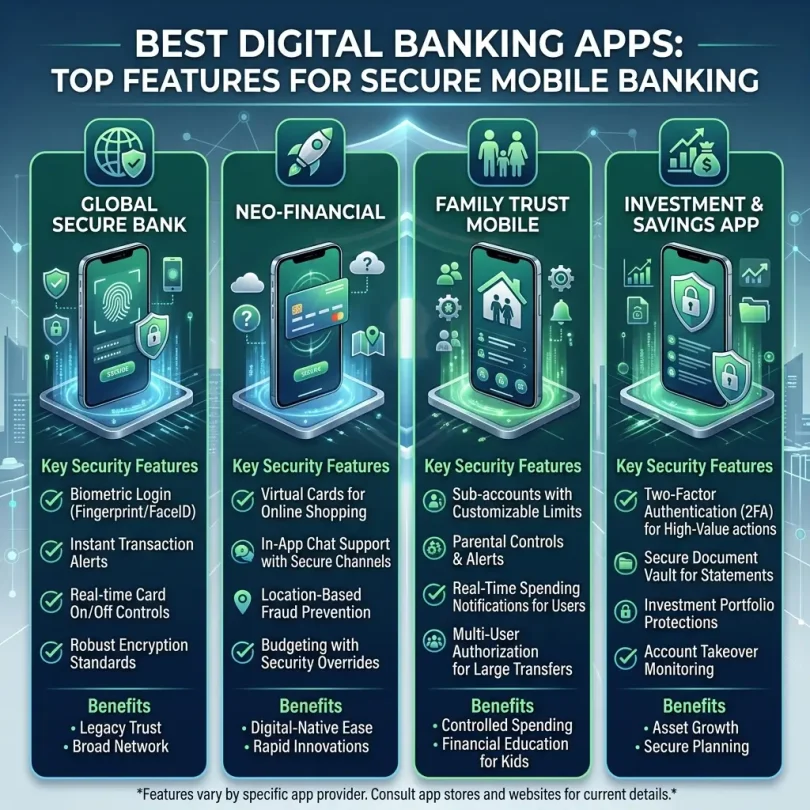
A secure digital banking app should help users reduce risk with alerts, login protection, card controls, and clear account monitoring.
Best Digital Banking Apps for Secure Mobile Banking
Below are strong digital banking apps to compare. Availability, features, fees, and account terms may change, so always verify details before opening or using an account.
1. Chase Mobile
Best for: Comprehensive mobile banking from a large bank
Good for: Checking users, credit card users, bill pay users, branch users
Main strength: Full-service banking inside one mobile app
Chase Mobile is one of the most widely used banking apps in the United States. It supports checking, savings, credit cards, transfers, bill pay, mobile check deposit, Zelle, account alerts, card controls, and investment-related tools, depending on account type.
Forbes Advisor’s 2026 mobile banking app list rated Chase Mobile highly and named it best for comprehensive money management. (forbes.com)
Key Features
- Checking account access
- Savings account access
- Credit card management
- Bill pay
- Transfers
- Zelle
- Mobile check deposit
- Debit card lock
- Account alerts
- Credit score tools, where available
- Branch and ATM locator
- Secure messaging
- Large bank support
- Biometric login, depending on device
- Fraud monitoring
Why Chase Mobile Is Good
Chase Mobile is strong because it gives users many banking tools in one app. It is not only for checking balances. Users can manage cards, payments, transfers, bills, and alerts.
It is also useful for people who want both mobile banking and branch access.
Best Fit
Chase Mobile may fit:
- Large-bank users
- Checking account users
- Credit card users
- Bill pay users
- People who want branch access
- Users who want all-in-one banking
- Small business users with Chase accounts
Possible Downsides
Chase accounts may have monthly fees unless waiver requirements are met. Users should check account terms, not only app quality.
2. Capital One Mobile
Best for: Fee-friendly digital banking with strong app experience
Good for: Checking users, savings users, credit card users
Main strength: Simple app, card controls, and no-fee account options
Capital One Mobile is known for a clean app experience and strong digital tools. It supports checking, savings, credit cards, alerts, transfers, and card controls.
Forbes Advisor’s 2026 list rated Capital One Mobile highly and named it best for fee-free banking. (forbes.com)
Key Features
- Checking account access
- Savings account access
- Credit card management
- Debit card controls
- Credit card lock
- Account alerts
- Transfers
- Mobile check deposit
- Bill pay
- CreditWise tools
- ATM locator
- Biometric login, depending on device
- Large bank brand
- No monthly fees on many 360 products
Why Capital One Mobile Is Good
Capital One Mobile is useful for users who want simple digital banking from a large brand. It works well for users who want checking, savings, and card management in one app.
The app is also good for users who want to quickly monitor card transactions and receive alerts.
Best Fit
Capital One Mobile may fit:
- Online checking users
- Savings users
- Credit card users
- Large-bank users
- Beginners
- Users who want no monthly fee options
- People who want card controls
Possible Downsides
Some business banking products may depend on location. Users should verify account availability and fee details.
3. SoFi App
Best for: Checking, savings and money tools in one app
Good for: Direct deposit users, mobile-first users, high-yield savings users
Main strength: Checking and savings bundle with strong mobile experience
SoFi’s app is popular with users who want checking, savings, debit card access, direct deposit, savings vaults, and other money tools in one place.
Forbes Advisor’s 2026 mobile app list includes SoFi among top mobile banking app choices and lists it for earning rewards. (forbes.com)
Key Features
- Checking and savings access
- Savings vaults
- Direct deposit
- Early paycheck access, where eligible
- Debit card controls
- Transfers
- Mobile app alerts
- High-yield savings opportunity, depending on qualifying activity
- No account, service, or maintenance fees on Checking and Savings
- Member tools
- Budgeting-style dashboard
- FDIC-insured bank structure through SoFi Bank, N.A.
Why SoFi App Is Good
SoFi is strong for users who want one mobile-first account for both spending and saving. It is especially useful for people who use direct deposit and want automatic savings tools.
The app is also good for younger users, remote workers, and people who prefer digital-only banking.
Best Fit
SoFi may fit:
- Direct deposit users
- Mobile-first users
- High-yield savings users
- Online checking users
- Beginners
- People wanting one-app banking
- Users who want savings vaults
Possible Downsides
The best APY may require qualifying activity. Users should check current requirements before opening.
4. Ally Bank App
Best for: Online bank savings tools and simple account management
Good for: Savings users, checking users, goal-based savers
Main strength: Buckets, boosters and online-bank simplicity
Ally Bank’s app is a strong choice for users who want online checking, savings, CDs, transfers, and savings organization.
Ally is especially popular for savings buckets and automatic savings tools. These can help users organize emergency funds, travel savings, tax savings, home repair savings, and other goals.
Key Features
- Online savings account access
- Spending account access
- Savings buckets
- Savings boosters
- Transfers
- Mobile check deposit
- Debit card controls
- Account alerts
- CD management
- Secure login
- ATM locator
- No branch requirement
- FDIC-insured bank
Why Ally App Is Good
Ally is useful for users who want a clean online bank app and strong savings organization.
It works well for emergency fund users, goal-based savers, and people who want checking plus savings without monthly branch-bank fees.
Best Fit
Ally may fit:
- Emergency fund savers
- Goal-based savers
- Online checking users
- People who like account organization
- Users who do not need branches
- Beginners
Possible Downsides
Ally does not have physical branches. Cash deposits may be less convenient than at branch-based banks.
5. Discover Mobile Banking App
Best for: Simple no-fee online banking and card management
Good for: Checking users, savings users, Discover card users
Main strength: Simple account tools and cashback debit support
Discover’s mobile app supports online banking and card management. It can be useful for users who want online checking, savings, alerts, and debit card tools.
Discover is also known for cashback debit features on eligible checking account purchases, depending on product terms.
Key Features
- Online checking access
- Online savings access
- Credit card management
- Debit card management
- Account alerts
- Transfers
- Mobile check deposit
- Bill pay
- Card lock
- Transaction monitoring
- No monthly fee on many banking products
- FDIC-insured bank
Why Discover App Is Good
Discover is useful for users who want a simple app and no monthly fee banking options. It is also convenient for users who already have Discover credit cards.
Best Fit
Discover may fit:
- No-fee checking users
- Online savings users
- Discover card users
- Debit card users
- Mobile-first users
- Beginners
Possible Downsides
Discover may not fit users who need branch access or frequent cash deposits.
6. Chime App
Best for: Mobile-first everyday banking features
Good for: Early direct deposit users, no-overdraft-fee seekers, app-first users
Main strength: Simple mobile banking-style experience
Chime is a fintech banking app that works with partner banks. It is popular with users who want a simple app, early direct deposit, no monthly fee structure, and mobile-first account access.
Important: Chime is a financial technology company, not a bank. Banking services are provided by partner banks.
Key Features
- Mobile banking-style app
- Checking-style account
- Savings-style account
- Early direct deposit, where eligible
- Debit card
- SpotMe-style overdraft feature, where eligible
- Account alerts
- Mobile check deposit, depending on eligibility
- Savings tools
- Partner bank deposit structure
- No physical branches
Why Chime App Is Good
Chime may be useful for users who want a simple app and early paycheck access. It is popular among users who want fewer traditional account fees and mobile-first controls.
Best Fit
Chime may fit:
- Mobile-first users
- Early direct deposit users
- Users avoiding monthly fees
- Beginners
- People who do not need branches
- Users wanting simple account tools
Possible Downsides
Chime is not a bank itself. Users should understand partner-bank structure, deposit insurance disclosures, account limitations, and customer support model.
Also, users should be careful with marketing claims in general. Reuters reported in June 2026 that J.D. Power sued Chime over “#1 ranking” advertising claims, and Chime disputed the lawsuit. (reuters.com)
7. Varo Bank App
Best for: Mobile bank users seeking savings features
Good for: Smaller-balance savers, direct deposit users, app-first users
Main strength: Mobile banking with savings tools
Varo Bank is a mobile-first bank that offers checking-style and savings accounts. It is often compared by users who want an app-based bank and high-yield savings potential when requirements are met.
Key Features
- Mobile bank account
- Checking-style account
- Savings account
- Debit card
- Direct deposit
- Early paycheck access, where eligible
- Savings tools
- No branch requirement
- FDIC-insured bank
- Mobile app alerts
Why Varo App Is Good
Varo may be useful for users who want a mobile-first bank rather than a fintech platform working through partner banks.
It can also be useful for smaller-balance savers who can meet requirements for higher APY tiers.
Best Fit
Varo may fit:
- Mobile-first users
- Smaller-balance savers
- Direct deposit users
- Beginners
- People who do not need branches
- Users who want app-first banking
Possible Downsides
Top APY may require qualifying activity or balance limits. Always read current requirements.
8. Current App
Best for: Mobile-first users and everyday spending tools
Good for: Younger users, debit card users, direct deposit users
Main strength: Fast app experience and modern spending tools
Current is a mobile banking app built for everyday spending, saving, and direct deposit. It works through partner bank relationships.
Key Features
- Mobile app banking-style account
- Direct deposit
- Debit card
- Savings pods
- Spending insights
- Teen banking options, depending on product
- Overdrive-style features, where eligible
- No branch requirement
- Account alerts
- Partner bank structure
Why Current App Is Good
Current may be useful for users who want a simple mobile account focused on spending and saving. It can also fit younger users and users who want a modern app experience.
Best Fit
Current may fit:
- App-first users
- Younger users
- Direct deposit users
- Debit card users
- Simple savings users
- People avoiding branch banking
Possible Downsides
Current is not a traditional bank itself. Users should understand partner bank disclosures, fees, eligibility, and account limits.
9. Axos All-In-One Mobile Banking
Best for: Digital-first users wanting online bank tools
Good for: Online checking users, savings users, mobile users
Main strength: Online banking from an established digital bank
Axos Bank offers online banking products and a mobile app for managing checking, savings, loans and other accounts.
Forbes Advisor’s 2026 app list rated Axos All-In-One Mobile Banking highly and listed it as best for digital-first users. (forbes.com)
Key Features
- Online checking
- Savings account access
- Mobile app
- Transfers
- Mobile deposits
- Debit card tools
- Account alerts
- Online bank support
- No branch requirement
- FDIC-insured bank
- Business banking options
Why Axos App Is Good
Axos is a useful option for users who want digital-first banking from an actual bank rather than a fintech app.
It can fit both personal and business banking needs, depending on account type.
Best Fit
Axos may fit:
- Digital-first users
- Online checking users
- Savings users
- Small business users
- Users who want an online bank
- People who do not need branches
Possible Downsides
App experience and features may vary by account type. Users should compare account fees, APY, and deposit rules.
10. Bank of America Mobile Banking App
Best for: Large-bank digital tools and broad account management
Good for: Existing Bank of America users, branch users, card users
Main strength: Large-bank app with broad features
Bank of America’s mobile banking app supports checking, savings, credit cards, transfers, bill pay, mobile check deposit, Zelle, alerts, card management, and virtual assistant tools.
Bank of America is useful for users who want mobile banking plus branch access.
Key Features
- Checking account access
- Savings account access
- Credit card management
- Bill pay
- Zelle
- Transfers
- Mobile check deposit
- Card lock
- Fraud alerts
- Erica virtual assistant
- Branch and ATM locator
- Large bank support
- Business banking options
Why Bank of America App Is Good
Bank of America’s app is strong for users who want a full large-bank digital experience. It can be useful for users who manage many accounts inside one banking relationship.
Best Fit
Bank of America may fit:
- Existing customers
- Branch users
- Credit card users
- Checking and savings users
- Business banking users
- People who want large-bank support
Possible Downsides
Some accounts may have monthly maintenance fees unless waiver requirements are met. Users should review fee schedules.
Quick Comparison Table
| App | Best For | Main Strength | Best User Type |
|---|---|---|---|
| Chase Mobile | Full-service banking | Comprehensive account tools | Large-bank users |
| Capital One Mobile | Fee-friendly digital banking | Simple app and card controls | Checking/savings users |
| SoFi App | Checking + savings bundle | One-app banking | Direct deposit users |
| Ally App | Savings goals | Buckets and boosters | Emergency fund savers |
| Discover App | No-fee online banking | Simple banking and card tools | Debit/card users |
| Chime App | Mobile-first banking | Early direct deposit style tools | App-first users |
| Varo App | Mobile bank savings | Savings tools and app access | Smaller-balance savers |
| Current App | Everyday spending | Modern mobile account tools | Younger users |
| Axos App | Digital-first bank | Online bank tools | Digital-first users |
| Bank of America App | Large-bank digital tools | Full account management | Existing customers |
What Features Make a Digital Banking App Secure?
1. Biometric Login
Look for:
- Face ID
- Fingerprint login
- Device PIN backup
- App timeout
- Session logout
Biometric login can make access easier while reducing password typing in public.
2. Two-Factor Authentication
Two-factor authentication adds a second step beyond the password.
Good options:
- Authenticator app
- Push approval
- Passkeys
- Hardware security key, where supported
- SMS code as backup
The FTC says two-factor authentication adds an extra layer of security because a stolen password alone is not enough to access an account. (consumer.ftc.gov)
3. Account Alerts
A good app should support alerts for:
- Debit card purchases
- Large withdrawals
- Transfers
- Low balance
- New device login
- Password changes
- External account changes
- Wire transfers
- Zelle or instant payments
- Bill payments
- Failed login attempts
4. Card Lock and Unlock
Card lock is one of the most useful mobile banking features.
If your card is lost or stolen, you can freeze it quickly.
5. Device Management
Good apps let users review trusted devices and remove unknown devices.
6. Secure Messaging
Secure in-app messaging is safer than replying to random emails or texts.
7. App Store Verification
The app should be available through official app stores.
Avoid APK downloads or suspicious links.
8. Fraud Monitoring
Banks may monitor suspicious transactions and send alerts.
9. Password Reset Protection
Password reset should require strong verification.
10. Session Timeout
The app should log out after inactivity.
Best Digital Banking App by User Type
Best for Beginners
Good options:
- Capital One
- Discover
- SoFi
- Ally
- Chase
Beginners should choose an app with clear navigation, strong alerts, simple fees, and good support.
Best for High-Yield Savings
Good options:
- SoFi
- Ally
- Varo
- Discover
- Capital One
Savings users should compare APY, account requirements, and transfer speed.
Best for Checking
Good options:
- Chase
- Capital One
- SoFi
- Discover
- Axos
Checking users need debit card controls, bill pay, ATM access, and alerts.
Best for Budgeting
Good options:
- Ally
- SoFi
- Capital One
- Chime
- Current
Budgeting users should look for spending categories, savings goals, automatic transfers, and alerts.
Best for Large-Bank Users
Good options:
- Chase
- Bank of America
- Capital One
Large-bank users may want branch access plus strong digital tools.
Best for App-Only Users
Good options:
- SoFi
- Chime
- Varo
- Current
- Axos
App-only users should verify deposit insurance, account rules, support, and transfer limits.
Best for Business Users
Good options:
- Chase
- Bank of America
- Axos
- Mercury
- Bluevine
- Relay
Business users need permissions, ACH/wire tools, accounting integrations, and fraud controls.
Mobile Banking Safety Checklist
Use this checklist before trusting a banking app:
- Is it from a real bank, credit union, or clear partner-bank provider?
- Is the app downloaded from the official app store?
- Is deposit insurance explained clearly?
- Does the app support two-factor authentication?
- Does the app support biometric login?
- Can you lock your card?
- Can you set transaction alerts?
- Can you manage external transfers?
- Can you contact support from the app?
- Are fees clear?
- Are APY requirements clear?
- Are transfer limits clear?
- Does it show trusted devices?
- Does it warn about suspicious activity?
- Does it log out automatically?
- Does it have good user reviews?
- Does it receive regular updates?
Digital Banking App Security Tips
1. Use a Strong Device Lock
Use a strong PIN, Face ID, or fingerprint.
Avoid simple PINs like:
- 1111
- 1234
- 0000
- Birth year
- Phone number digits
2. Use a Strong Bank Password
Use a unique password for your bank app.
Do not reuse passwords.
3. Secure Your Email
Your email can reset your banking password. Protect it with 2FA.
4. Avoid Public Wi-Fi
Do not open banking apps on public Wi-Fi if possible.
Use mobile data or trusted secure networks.
5. Turn On Alerts
Alerts help you catch fraud quickly.
6. Do Not Click Bank Links in Texts
Open the app directly.
7. Update the App
Use the latest version of your bank app.
8. Keep Your Phone Updated
Phone security updates matter.
9. Use Official App Stores
Do not download fake banking apps.
10. Lock Your Card When Needed
If your card is missing, lock it immediately.
Common Digital Banking App Mistakes
Mistake 1: Choosing an App Only Because It Looks Modern
A clean design is not enough. Check deposit insurance, fees, support, and security.
Mistake 2: Ignoring Whether the Provider Is a Bank
Some apps are fintech platforms, not banks. They may work with partner banks. Read disclosures.
Mistake 3: Not Turning On Alerts
Alerts are one of the easiest security protections.
Mistake 4: Using SMS as the Only Protection
SMS 2FA is better than nothing, but stronger methods are better where available.
Mistake 5: Downloading From Links
Download apps only from official app stores.
Mistake 6: Keeping All Money in One App
A backup account can help if your app is locked or unavailable.
Mistake 7: Not Checking Fees
Some accounts charge fees for transfers, withdrawals, or advanced features.
Mistake 8: Ignoring Transfer Limits
Limits matter during emergencies.
Mistake 9: Trusting Fake Support
Banks do not need your password or one-time code.
Mistake 10: Not Updating Contact Information
If your phone number or email is outdated, account recovery can become difficult.
Digital Banking App vs Traditional Online Banking
Digital Banking App
Best for:
- Mobile-first users
- Fast balance checks
- Card controls
- Alerts
- Transfers
- Savings goals
- Modern budgeting
- Direct deposit users
Traditional Online Banking Website
Best for:
- Large screens
- Detailed statements
- Complex transfers
- Business activity
- Downloading records
- Tax documents
- Account administration
Most users need both: app for daily use and website for detailed management.
What to Do If Your Banking App Is Compromised
Step 1: Contact the Bank
Use the official phone number from the bank website, card, or app.
Step 2: Lock Cards
Freeze debit and credit cards if needed.
Step 3: Change Password
Change your banking password from a clean device.
Step 4: Secure Email
Change email password and review login sessions.
Step 5: Remove Unknown Devices
Check trusted devices and remove anything suspicious.
Step 6: Review Transactions
List suspicious activity with dates and amounts.
Step 7: File Fraud Report
Report unauthorized transfers immediately.
Step 8: Monitor Other Accounts
If one account is compromised, other accounts may be at risk.
Final Verdict: What Are the Best Digital Banking Apps?
The best digital banking app depends on your needs.
For most users:
- Best comprehensive large-bank app: Chase Mobile
- Best fee-friendly digital banking app: Capital One Mobile
- Best checking and savings app: SoFi
- Best savings goal app: Ally Bank
- Best simple no-fee online banking app: Discover
- Best mobile-first banking-style app: Chime
- Best mobile bank for savings tools: Varo
- Best app for everyday mobile spending: Current
- Best digital-first bank app: Axos
- Best large-bank account management app: Bank of America
If you want a large bank, compare Chase, Capital One, and Bank of America. If you want online banking with savings tools, compare Ally, SoFi, Discover, and Varo. If you want mobile-first banking-style features, compare Chime, Current, and SoFi, but always review partner-bank disclosures and account rules.
The best app is not only the one with the prettiest design. It is the one that protects your account, shows clear fees, gives quick alerts, supports secure login, lets you control cards, and makes everyday banking easier.
FAQs About Digital Banking Apps
What is a digital banking app?
A digital banking app is a mobile app that lets users manage bank accounts or banking-style services from a smartphone.
What is the best digital banking app?
The best app depends on your needs. Chase is strong for comprehensive banking, Capital One is strong for fee-friendly digital banking, SoFi is good for checking and savings, Ally is good for savings goals, and Discover is useful for simple online banking.
Are digital banking apps safe?
They can be safe when provided by trusted institutions and used with strong passwords, two-factor authentication, biometric login, alerts, and official app downloads.
Which banking app is best for security?
Apps from Chase, Capital One, Bank of America, SoFi, Ally, Discover, Axos, and other reputable providers may offer strong security features. Users should compare 2FA, alerts, card lock, device management, and fraud support.
Should I use biometric login for mobile banking?
Yes, biometric login can make account access easier and safer, but you should still use a strong device PIN and strong account password.
Is two-factor authentication important for banking apps?
Yes. The FTC says two-factor authentication adds an extra security layer beyond passwords. (consumer.ftc.gov)
Can fake banking apps steal money?
Yes. Fake apps can steal login details or personal information. Download banking apps only from official app stores.
Is Chime a bank?
Chime is a fintech company, not a bank. Banking services are provided by partner banks. Users should read official disclosures.
Is Varo a bank?
Varo Bank is a mobile-first bank. Users should still review account fees, APY requirements, and deposit insurance details.
Which app is best for high-yield savings?
SoFi, Ally, Varo, Discover, and Capital One are worth comparing for savings features, but APYs and requirements change.
Which app is best for business banking?
Chase, Bank of America, Axos, Mercury, Bluevine, and Relay are useful options to compare for business banking.
How do I protect my mobile banking app?
Use a strong password, enable 2FA, secure your email, use biometric login, turn on alerts, avoid public Wi-Fi, update your phone, and never share one-time codes.