
A checking account should make everyday money management easier, not more expensive.
Many people still pay monthly maintenance fees, overdraft fees, ATM fees, paper statement fees, wire fees, and minimum balance fees. These charges may look small, but they can add up over time.
That is why online checking accounts with no monthly fees are popular. A good no-fee online checking account can help users receive direct deposit, pay bills, use a debit card, withdraw cash, send transfers, deposit checks through a mobile app, lock a card instantly, receive alerts, and manage money without paying a monthly maintenance charge.
The best account is not only the account that says “no monthly fee.” It should also offer useful ATM access, strong security, clear overdraft rules, mobile banking, good customer support, fast transfers, and deposit insurance.
Recent checking-account comparisons show that many top online checking options focus on no monthly fees, no or low minimum opening deposits, large ATM networks, app access, and reduced overdraft costs. NerdWallet’s 2026 free checking list says the best free checking accounts generally have no monthly fees, access to large free ATM networks, and no or low minimum opening deposits. Forbes Advisor’s 2026 checking-account list names Capital One 360 Checking as best for avoiding fees and SoFi Checking and Savings as a strong integrated checking/savings option.
This guide compares the best online checking accounts with no monthly fees, explains what fees to avoid, and gives practical tips for choosing a secure account for daily banking.
Important Disclaimer
This article is for general informational purposes only. It is not banking, legal, tax, investment, accounting, cybersecurity, or professional advice.
Checking account fees, APYs, ATM access, overdraft rules, account limits, deposit insurance, transfer speeds, eligibility, and features can change. Always verify details directly with the bank, credit union, or provider before opening an account or using any service.
What Is an Online Checking Account?
An online checking account is a checking account that can be managed mainly through a website or mobile app.
It may be offered by:
- Online banks
- Traditional banks with digital accounts
- Credit unions
- Digital banking platforms
- Fintech platforms working with partner banks
An online checking account may include:
- Debit card
- Direct deposit
- ACH transfers
- Mobile check deposit
- Online bill pay
- ATM withdrawals
- Debit card lock
- Account alerts
- Zelle or instant payments, where available
- Overdraft protection options
- Paper checks, depending on bank
- Virtual card tools, depending on provider
- Budgeting tools
- Savings transfers
- Mobile app support
Online checking accounts are designed for everyday spending and money movement.
Why No Monthly Fee Checking Matters
A monthly maintenance fee can reduce your money every month without adding much value.
For example:
- $5 monthly fee = $60 per year
- $10 monthly fee = $120 per year
- $15 monthly fee = $180 per year
If you are trying to save money, build an emergency fund, manage bills, or avoid unnecessary costs, a no-monthly-fee checking account can help.
No monthly fee checking is useful for:
- Students
- Freelancers
- Remote workers
- Beginners
- Families
- Low-balance users
- Online banking users
- People avoiding branch fees
- Anyone who wants simpler banking
But “no monthly fee” does not always mean “no fees at all.”
You still need to check ATM fees, overdraft fees, wire fees, foreign transaction fees, cashier’s check fees, paper statement fees, replacement card fees, and stop payment fees.
Online Checking vs Traditional Checking
Online Checking
Best for:
- Mobile banking
- Low fees
- Direct deposit
- Debit card spending
- Online transfers
- Bill pay
- Remote workers
- People who do not use branches often
Common benefits:
- No monthly fee
- Better app tools
- Larger ATM partnerships
- Faster setup
- Lower minimums
- Better alerts
- Card controls
Possible limits:
- Cash deposits may be harder
- No branch support
- Some transfer limits
- Customer support may be online or phone-only
Traditional Checking
Best for:
- Branch users
- Cash deposit users
- Local business users
- People who want in-person help
- Customers needing cashier’s checks often
- Users who want local banker support
Common benefits:
- Branch access
- Cash deposits
- In-person support
- Local services
- Safe deposit boxes, where available
Possible downsides:
- Monthly fees
- Balance requirements
- Overdraft fees
- Smaller free ATM network
- Less modern app tools
Many users choose online checking for daily use and keep a traditional bank account only if they need branch access.
Best Online Checking Accounts With No Monthly Fees
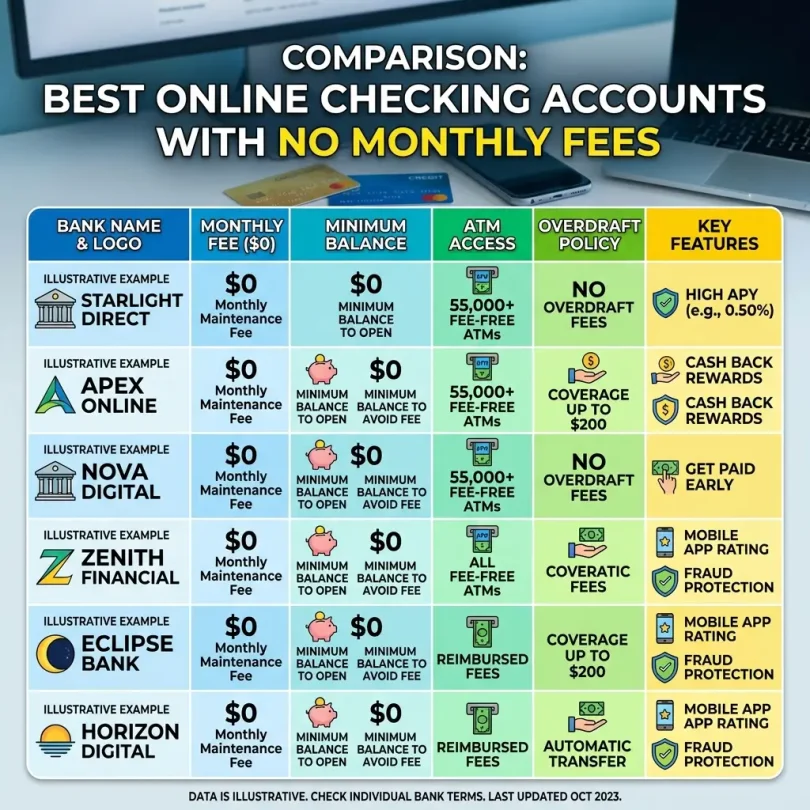
Below are strong online checking accounts to compare. Account terms change often, so always check the current official details before opening.
1. Capital One 360 Checking
Best for: Avoiding common checking fees
Good for: Everyday checking, ATM access, large-bank comfort
Main strength: No monthly fee, no overdraft fee, and strong digital banking
Capital One 360 Checking is one of the most popular online checking accounts. Forbes Advisor lists it as best for avoiding fees, while Bankrate notes that Capital One 360 Checking does not charge monthly fees or overdraft fees.
Capital One 360 Checking also offers online and mobile banking, debit card access, bill pay, transfers, and ATM access.
Key Features
- No monthly maintenance fee
- No minimum opening deposit
- No overdraft fee
- Debit card
- Online banking
- Mobile banking
- Bill pay
- Transfers
- ATM access
- Account alerts
- Large bank brand
- FDIC-insured bank
- Some branch/café access in certain locations
Why Capital One 360 Checking Is Good
Capital One 360 Checking is strong because it combines online banking convenience with a familiar large-bank brand.
It is a good fit for users who want fewer checking fees but do not want to use a small or unfamiliar platform.
Best Fit
Capital One 360 Checking may fit:
- Everyday checking users
- Beginners
- ATM users
- Large-bank users
- No-fee banking users
- Mobile banking users
- Users who want no overdraft fees
Possible Downsides
Capital One branch access depends on location. Cash deposit options may not be as flexible as a traditional branch-heavy account in every area.
2. SoFi Checking and Savings
Best for: Checking and savings in one account setup
Good for: Direct deposit users, mobile-first users, high-yield savings users
Main strength: Combined checking and savings with no account, service, or maintenance fees
SoFi Checking and Savings is a popular digital banking option for users who want checking and savings together in one app.
SoFi states that Checking and Savings has no account fees, no monthly fees, and no minimum balance fees, though some transaction-related fees may apply. Forbes Advisor lists SoFi Checking and Savings as best for integrated checking and savings in its 2026 checking-account list.
Key Features
- Checking and savings together
- No monthly account fee
- No minimum balance fee
- Debit card
- Direct deposit
- Early paycheck access, where eligible
- Savings vaults
- Mobile app
- Transfers
- Bill pay
- Account alerts
- High-yield savings opportunity, depending on qualifying activity
- FDIC-insured SoFi Bank, N.A. structure with possible program-bank features
Why SoFi Is Good
SoFi is useful for users who want one app for daily spending and savings goals.
It can work well for people who receive direct deposit, want early access to paychecks, and want automatic savings tools.
Best Fit
SoFi may fit:
- Direct deposit users
- Mobile-first users
- Users who want checking and savings together
- High-yield savings users
- People wanting early paycheck access
- Beginners
- App-first banking users
Possible Downsides
The best savings APY may require qualifying deposits or direct deposit. Users should check current requirements.
3. Ally Spending Account
Best for: Online bank users wanting checking plus savings tools
Good for: Ally savings users, no-branch users, online banking users
Main strength: Strong online banking ecosystem
Ally’s Spending Account works well with Ally Online Savings. Ally is popular because of its online banking tools, savings buckets, no monthly maintenance fee on savings, and general digital banking experience.
Key Features
- Online checking-style account
- Debit card
- No monthly maintenance fee
- No minimum opening deposit
- ATM network access
- ATM fee reimbursement up to account limits, depending on terms
- Mobile check deposit
- Bill pay
- Transfers
- Spending buckets, depending on account tools
- FDIC-insured bank
- Works well with Ally savings
Why Ally Is Good
Ally is a strong all-around online bank. If you already use Ally savings, its checking account can make transfers and daily banking easier.
It is especially good for users who want online banking without branch visits.
Best Fit
Ally may fit:
- Online banking users
- People who use Ally savings
- Emergency fund savers
- Bill pay users
- Mobile check deposit users
- People who do not need branches
Possible Downsides
Cash deposits can be inconvenient because Ally does not operate traditional branches.
4. Discover Cashback Debit
Best for: Debit card users who want cashback
Good for: No-fee checking, debit spenders, online banking users
Main strength: Cashback debit on eligible purchases
Discover Cashback Debit is a popular online checking account for users who frequently use a debit card.
Discover is known for no monthly fees on many banking products and cashback debit features on qualifying purchases.
Key Features
- No monthly maintenance fee
- Debit card
- Cashback on eligible debit purchases, depending on terms
- No minimum opening deposit, depending on current rules
- Online banking
- Mobile banking
- Mobile check deposit
- Bill pay
- ATM access
- Account alerts
- FDIC-insured bank
Why Discover Cashback Debit Is Good
Discover is useful for people who prefer debit cards and want a simple online checking account.
The cashback debit feature can be attractive for users who avoid credit cards but still want rewards-style value.
Best Fit
Discover may fit:
- Debit card users
- No-monthly-fee banking users
- Online checking users
- Discover customers
- People who want simple account rules
- Users who do not need branch access
Possible Downsides
Discover may not be ideal for users who need frequent cash deposits or branch support.
5. Axos Essential Checking
Best for: Digital-first online checking
Good for: Online users, direct deposit users, mobile check deposit users
Main strength: Online bank account from an FDIC-insured bank
Axos Bank offers online checking accounts and was listed by Forbes Advisor in its 2026 best checking-account roundup for Axos ONE Checking and customer support strength.
Axos Essential Checking is often compared by users who want an online checking account with no monthly maintenance fee.
Key Features
- Online checking
- No monthly maintenance fee
- No minimum balance requirement
- Direct deposit
- Debit card
- Mobile banking
- Mobile check deposit
- ATM fee reimbursements, depending on account terms
- Bill pay
- Transfers
- FDIC-insured bank
- Online support
Why Axos Is Good
Axos is useful for users who want online checking from a digital bank rather than a fintech platform.
It can be a good fit for users who want lower fees and a full online account.
Best Fit
Axos may fit:
- Digital-first users
- Direct deposit users
- Online checking users
- Mobile deposit users
- People who want no monthly fee
- Users who do not need branches
Possible Downsides
Users should compare different Axos checking products carefully because features, APYs, and requirements may differ by account.
6. NBKC Bank Everything Account
Best for: Simple checking and savings-style account in one
Good for: No-minimum users, simple online banking users
Main strength: No minimum opening deposit and simple account structure
NBKC Bank’s Everything Account is often included in checking-account comparisons. Forbes Advisor lists NBKC Bank Everything Account as best for no minimum deposit in its 2026 checking-account list.
Key Features
- Checking and savings-style combined account structure
- No minimum opening deposit
- No monthly maintenance fee
- Debit card
- Online banking
- Mobile banking
- Mobile check deposit
- Bill pay
- ATM access
- FDIC-insured bank
- Simple account rules
Why NBKC Is Good
NBKC is useful for users who want a simple online account without a required opening deposit.
It may fit users who want easy digital banking and fewer common checking fees.
Best Fit
NBKC may fit:
- Beginners
- No-minimum users
- Online banking users
- People who want simple checking
- Users avoiding monthly fees
- Users who want an FDIC-insured bank account
Possible Downsides
NBKC may not be as well-known as large banks, and branch access is limited compared with national banks.
7. Schwab Bank Investor Checking
Best for: Travelers and ATM fee reimbursement
Good for: Frequent travelers, ATM users, brokerage customers
Main strength: Worldwide ATM fee rebates and no foreign transaction fees on debit card use
Schwab Bank Investor Checking is popular among travelers because it is known for broad ATM fee rebates and foreign-use benefits.
It is linked to a Schwab brokerage account, so it is best for users comfortable with that account setup.
Key Features
- No monthly service fee
- No account minimum
- Debit card
- ATM fee rebates
- No foreign transaction fees on debit card purchases, depending on terms
- Online banking
- Mobile check deposit
- Bill pay
- FDIC-insured bank checking account
- Linked brokerage account requirement
Why Schwab Checking Is Good
Schwab is excellent for users who withdraw cash while traveling or want ATM flexibility.
It can be especially useful for international travelers who want to reduce ATM-related costs.
Best Fit
Schwab may fit:
- Travelers
- ATM users
- International users
- Brokerage customers
- Digital banking users
- People who want ATM fee rebates
Possible Downsides
The account is tied to a brokerage relationship. Users who only want a simple checking account may prefer Capital One, SoFi, Ally, Discover, or Axos.
8. Alliant Credit Union High-Rate Checking
Best for: Online credit union checking
Good for: Credit union users, ATM users, checking plus savings users
Main strength: NCUA-insured credit union account with digital tools
Alliant Credit Union offers online checking and savings products. It is a strong option for people who like credit unions but want online banking convenience.
Credit union accounts use NCUA insurance, not FDIC insurance.
Key Features
- Online checking
- No monthly service fee
- Debit card
- ATM access
- ATM fee rebates, depending on terms
- Mobile banking
- Mobile check deposit
- Online bill pay
- Savings account options
- NCUA-insured credit union
- Membership requirement
Why Alliant Is Good
Alliant is useful for users who want credit union-style banking with strong online account access.
It may also fit people who want both checking and savings in one credit union.
Best Fit
Alliant may fit:
- Credit union users
- Online checking users
- ATM users
- People wanting no monthly service fee
- Checking and savings users
- Users comfortable with membership requirements
Possible Downsides
Membership requirements apply. Users should review how to qualify before applying.
9. Chime Checking-Style Account
Best for: Mobile-first users avoiding traditional fees
Good for: Early direct deposit users, app-first users, simple banking users
Main strength: Simple mobile banking-style experience
Chime is a fintech company, not a bank. Banking services are provided by partner banks.
Chime is popular with users who want a simple mobile-first account, no monthly fee structure, debit card use, early direct deposit where eligible, and app-based banking.
Key Features
- Mobile checking-style account
- No monthly fee
- Debit card
- Early direct deposit, where eligible
- Mobile banking app
- Alerts
- SpotMe-style overdraft feature, where eligible
- Savings-style account option
- Partner bank structure
- No branch access
Why Chime Is Good
Chime can be useful for users who want a simple app-based account and do not need branches.
It may appeal to people who want early direct deposit and fewer traditional account fees.
Best Fit
Chime may fit:
- Mobile-first users
- Early direct deposit users
- People avoiding monthly fees
- Beginners
- App-first banking users
- Users who do not need branches
Possible Downsides
Chime is not a bank itself. Users should read partner-bank disclosures, transfer limits, customer support rules, and account restrictions carefully.
10. Varo Bank Account
Best for: Mobile-first bank checking
Good for: App-first users, direct deposit users, savings users
Main strength: Mobile banking from a bank
Varo Bank is a mobile-first bank. It offers banking through a mobile app and can be a useful option for users who want a simple online checking-style account with savings options.
Key Features
- Mobile bank account
- No monthly fee
- Debit card
- Direct deposit
- Early direct deposit, where eligible
- Mobile app
- Savings account option
- Account alerts
- FDIC-insured bank
- No branch access
Why Varo Is Good
Varo is good for users who want mobile-first banking from a bank rather than a fintech platform.
It can work for users who want checking and savings in a simple app.
Best Fit
Varo may fit:
- Mobile-first users
- Direct deposit users
- Beginners
- App-first banking users
- Users who want savings tools
- People who do not need branches
Possible Downsides
Top savings APY may require qualifying activity, and the account may not fit users who need branches, cash deposits, or advanced banking services.
Quick Comparison Table
| Account | Best For | Main Strength | Best User Type |
|---|---|---|---|
| Capital One 360 Checking | Avoiding fees | No monthly or overdraft fee | Everyday users |
| SoFi Checking and Savings | Checking + savings | One-app setup | Direct deposit users |
| Ally Spending Account | Online bank ecosystem | Works well with Ally savings | Online users |
| Discover Cashback Debit | Debit rewards | Cashback debit | Debit card users |
| Axos Essential Checking | Digital-first checking | Online bank account | Mobile users |
| NBKC Everything Account | Simple account | No minimum deposit | Beginners |
| Schwab Investor Checking | Travelers | ATM fee rebates | Travelers |
| Alliant High-Rate Checking | Credit union users | NCUA-insured online checking | Credit union users |
| Chime | Mobile-first users | Simple app-based account | App-first users |
| Varo Bank Account | Mobile bank users | Checking plus savings tools | Digital users |
What Fees to Watch in Checking Accounts
A checking account may have no monthly fee but still charge other fees.
1. Monthly Maintenance Fee
This is the main fee to avoid.
A true no-monthly-fee account should not require a minimum balance or direct deposit to avoid the monthly fee.
2. Overdraft Fee
Overdraft fees can be expensive.
The CFPB said a 2024 overdraft final rule was expected to save consumers up to $5 billion annually in overdraft fees, or $225 per household that pays overdraft fees.
Even if overdraft rules change, users should still choose accounts with clear overdraft protection and no surprise fees.
3. ATM Fee
ATM fees may include:
- Out-of-network ATM fee from your bank
- ATM operator fee
- International ATM fee
- Currency conversion fee
Look for large free ATM networks or reimbursement.
4. Wire Transfer Fee
Wire transfers may cost more than ACH transfers.
Check:
- Domestic outgoing wire fee
- Domestic incoming wire fee
- International outgoing wire fee
- International incoming wire fee
5. Foreign Transaction Fee
Travelers should check debit card foreign transaction fees.
6. Paper Statement Fee
Some banks charge for paper statements.
7. Stop Payment Fee
A bank may charge to stop a check or payment.
8. Replacement Card Fee
Lost cards may have replacement or expedited shipping fees.
9. Cashier’s Check Fee
Some online banks may not offer cashier’s checks or may charge for them.
10. Account Closure Fee
Some accounts may charge if closed too quickly after opening.
How to Choose the Best No-Fee Online Checking Account
1. Confirm No Monthly Fee
Check whether there is truly no monthly maintenance fee.
Some accounts waive monthly fees only if you meet requirements.
2. Check Minimum Balance Rules
Look for:
- No minimum opening deposit
- No minimum balance
- No minimum daily balance
- No direct deposit requirement to avoid fee
3. Review ATM Access
Ask:
- How many free ATMs are available?
- Are ATM fees reimbursed?
- Is cash deposit available?
- Are international ATMs supported?
- Are withdrawal limits reasonable?
4. Check Overdraft Policy
Look for:
- No overdraft fee
- Ability to turn overdraft off
- Clear overdraft protection
- No nonsufficient funds fee
- Grace period, if available
5. Check Mobile App Features
A good online checking app should include:
- Balance view
- Transfers
- Mobile check deposit
- Bill pay
- Debit card lock
- Alerts
- Secure login
- Biometric login
- Customer support
- Statement downloads
6. Check Deposit Insurance
For banks, confirm FDIC insurance. FDIC insurance covers $250,000 per depositor, per FDIC-insured bank, per ownership category.
For credit unions, confirm NCUA insurance.
For fintech platforms, check the partner bank disclosure carefully.
7. Check Transfer Limits
Review:
- ACH limits
- Debit card limits
- ATM withdrawal limits
- Mobile check deposit limits
- External transfer limits
- Wire limits
8. Check Cash Deposit Options
If you use cash often, many online banks may not fit.
Look for:
- ATM cash deposit
- Retail cash deposit
- Branch deposit
- Partner network
- Cash deposit fees
9. Check Customer Support
Online checking needs reliable support.
Check:
- Phone support
- Chat support
- Secure messaging
- Weekend hours
- Fraud support
- Card replacement support
10. Read User Reviews Carefully
User reviews can reveal issues with account freezes, app problems, deposit delays, or support.
But reviews can be biased, so compare multiple sources.
Best No-Fee Checking Account by User Type
Best for Everyday Users
Good options:
- Capital One 360 Checking
- SoFi Checking and Savings
- Ally Spending Account
- Discover Cashback Debit
Everyday users need reliable debit card access, bill pay, transfers, alerts, and no monthly fee.
Best for Direct Deposit Users
Good options:
- SoFi
- Chime
- Varo
- Capital One
- Discover
Direct deposit users should check early paycheck access, direct deposit requirements, and account limits.
Best for ATM Users
Good options:
- Schwab Investor Checking
- Capital One 360
- Alliant Credit Union
- Ally
ATM users should compare ATM network access and fee reimbursement.
Best for Debit Card Users
Good options:
- Discover Cashback Debit
- Capital One 360
- SoFi
- Chime
- Varo
Debit users should prioritize transaction alerts, card lock, and fraud support.
Best for Travelers
Good options:
- Schwab Investor Checking
- Capital One 360
- Revolut, where available
- Wise card, where available
Travelers should check foreign transaction fees, ATM fees, and card controls.
Best for Students
Good options:
- Capital One 360
- Discover
- SoFi
- Chime
- Varo
- Bank of America SafeBalance if under age 25 and fee waiver applies
Students should choose simple accounts with no monthly fee and strong mobile banking.
Bank of America says its Advantage SafeBalance Banking account has no monthly maintenance fee for users under age 25, according to its account page.
Best for Credit Union Users
Good options:
- Alliant Credit Union
- Local credit unions with online checking
- Credit unions with NCUA insurance
Credit union users should check membership rules and online tools.
No Monthly Fee Does Not Mean No Risk
A no-fee account can still create problems if:
- It has weak support
- Transfer limits are too low
- Cash deposits are difficult
- Mobile app is unreliable
- Fraud claims are slow
- ATM access is poor
- Account freezes are common
- Overdraft rules are confusing
- It is not clearly insured
- It is not a bank but marketing looks like one
Always read disclosures.
Online Checking Security Tips
Use Strong Passwords
Use a unique password only for banking.
Enable Two-Factor Authentication
Turn on two-factor authentication where available.
Secure Your Email
Email is often used for password recovery.
Turn On Alerts
Use alerts for:
- Debit card purchases
- ATM withdrawals
- Transfers
- Low balance
- New device login
- Password changes
- Card-not-present transactions
Use Debit Card Lock
If card is lost, lock it immediately.
Avoid Public Wi-Fi
Do not bank on public Wi-Fi.
Use Official Apps Only
Download banking apps from official app stores.
Review Transactions Weekly
Check account activity often.
Keep App Updated
Bank app updates can include security improvements.
Do Not Share Codes
Never share one-time security codes with callers or texters.
Online Checking Account Opening Checklist
Before opening, check:
- Is there a monthly maintenance fee?
- Is there a minimum deposit?
- Is there a minimum balance?
- Is direct deposit required?
- Are overdraft fees charged?
- Can overdraft be turned off?
- What ATM network is available?
- Are ATM fees reimbursed?
- Can I deposit cash?
- Is mobile check deposit available?
- Are there transfer limits?
- Is bill pay available?
- Is debit card lock available?
- Are alerts available?
- Is two-factor authentication available?
- Is the provider a bank or fintech?
- Is FDIC or NCUA coverage clear?
- What customer support is available?
- Are wire fees reasonable?
- Are foreign fees charged?
- Are paper checks available?
Common Mistakes With No-Fee Checking Accounts
Mistake 1: Choosing Only Based on No Monthly Fee
Look at ATM access, overdraft rules, support, and cash deposit options.
Mistake 2: Ignoring Overdraft Rules
No monthly fee does not always mean no overdraft fee.
Mistake 3: Not Checking ATM Network
Out-of-network ATM fees can add up.
Mistake 4: Ignoring Cash Deposit Needs
Online accounts may be weak for cash users.
Mistake 5: Not Reading Fintech Disclosures
Some apps are not banks. Check partner bank structure.
Mistake 6: Keeping Too Much in Checking
Move extra cash to savings to reduce spending and fraud exposure.
Mistake 7: Using Weak Passwords
A no-fee account still needs strong security.
Mistake 8: Not Using Alerts
Alerts can catch fraud quickly.
Mistake 9: Not Checking Transfer Limits
Limits can matter during urgent situations.
Mistake 10: Not Having Backup Access
Keep a backup payment method if your app or card is unavailable.
Best Setup for Daily Banking
A simple daily banking setup may look like this:
Checking Account
Use for:
- Direct deposit
- Debit card spending
- ATM withdrawals
- Bill pay
- Everyday transfers
High-Yield Savings Account
Use for:
- Emergency fund
- Short-term savings
- Rent reserve
- Car repair fund
- Travel savings
Backup Account or Card
Use for:
- App outages
- Lost debit card
- Account review delays
- Travel backup
Do not keep all money in one debit-card-connected checking account.
Final Verdict: What Are the Best Online Checking Accounts With No Monthly Fees?
The best online checking account depends on your needs.
For most users:
- Best overall fee-friendly checking: Capital One 360 Checking
- Best checking plus savings setup: SoFi Checking and Savings
- Best online bank ecosystem: Ally Spending Account
- Best debit cashback account: Discover Cashback Debit
- Best digital-first bank account: Axos Essential Checking
- Best no-minimum option: NBKC Everything Account
- Best for travelers and ATM users: Schwab Bank Investor Checking
- Best online credit union checking: Alliant Credit Union High-Rate Checking
- Best mobile-first account: Chime
- Best mobile bank account: Varo Bank Account
If you want a large-bank feel with no monthly fee, compare Capital One 360. If you want checking and savings together, compare SoFi and Ally. If you use a debit card often, compare Discover. If you travel or use ATMs frequently, compare Schwab. If you prefer credit unions, compare Alliant. If you want app-first banking, compare Chime and Varo, but read provider disclosures carefully.
The best no-fee checking account is not just cheap. It should be safe, easy to use, clear about fees, strong on security, and practical for your daily life.
FAQs About Online Checking Accounts With No Monthly Fees
What is an online checking account?
An online checking account is a checking account managed mainly through a website or mobile app. It may include debit card access, direct deposit, bill pay, transfers, mobile check deposit, and alerts.
What is the best online checking account with no monthly fees?
Capital One 360 Checking, SoFi Checking and Savings, Ally Spending Account, Discover Cashback Debit, Axos Essential Checking, NBKC Everything Account, Schwab Investor Checking, Alliant Checking, Chime, and Varo are common options to compare.
Does no monthly fee mean no fees at all?
No. An account may have no monthly maintenance fee but still charge wire fees, ATM fees, foreign transaction fees, paper statement fees, or other service fees.
Are online checking accounts safe?
They can be safe when offered by FDIC-insured banks or NCUA-insured credit unions and used with strong passwords, two-factor authentication, alerts, and official apps.
What is FDIC insurance?
FDIC insurance protects deposits at FDIC-insured banks up to $250,000 per depositor, per insured bank, per ownership category.
What is NCUA insurance?
NCUA insurance protects eligible deposits at federally insured credit unions within applicable limits.
Which checking account is best for avoiding overdraft fees?
Capital One 360 Checking is often highlighted for avoiding common fees and not charging overdraft fees.
Which checking account is best for direct deposit users?
SoFi, Chime, Varo, Capital One, and Discover are worth comparing for direct deposit users, especially if early paycheck access matters.
Which checking account is best for travelers?
Schwab Bank Investor Checking is popular with travelers because of ATM fee rebate features and debit card travel benefits.
Which checking account is best for students?
Capital One 360, Discover, SoFi, Chime, Varo, and age-based student or young adult accounts from large banks are worth comparing.
Can I deposit cash into an online checking account?
Some online checking accounts support cash deposits through ATMs or retail partners, but many do not. Check this before opening if you use cash often.
How do I protect an online checking account?
Use a strong unique password, enable two-factor authentication, secure your email, turn on alerts, use debit card lock, avoid public Wi-Fi, and review transactions weekly.