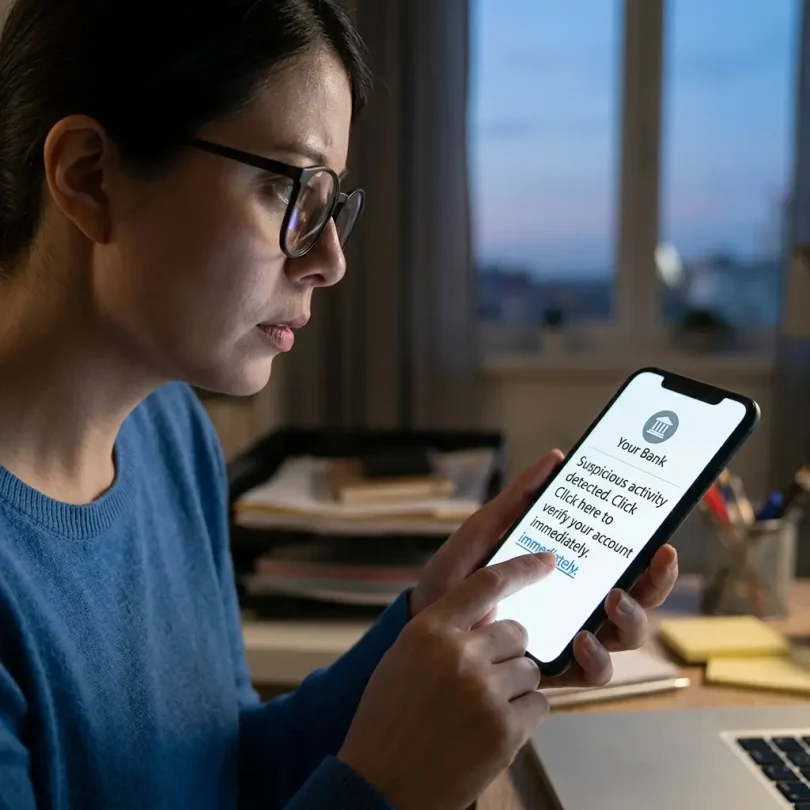

Online banking makes money management easier, but it also gives scammers more ways to attack bank customers.
A scammer does not always need to “hack” your bank. Many online banking fraud cases begin with manipulation. The scammer may pretend to be your bank, a government agency, a delivery company, tech support, a trusted business, a family member, a job recruiter, or an online seller.
They may send a fake text. They may call from a spoofed number. They may create a fake bank login page. They may ask for a one-time code. They may claim your account is under attack. They may pressure you to move money to a “safe account.” They may trick you into authorizing a payment yourself.
This is why online banking fraud protection is not only about passwords. It is about behavior, alerts, account controls, device safety, payment habits, and knowing what warning signs look like.
The threat is real. The Federal Trade Commission reported that people lost about $16 billion to fraud in 2025, the highest amount on record, and reported losses to imposter scams reached $3.5 billion. The FTC also said business impersonators caused nearly $1 billion in reported losses, with bank impersonators causing the highest reported losses among business impersonators. (ftc.gov)
Fraud protection starts before money leaves the account.
This guide explains the most common online banking fraud warning signs, the best tools to protect your bank account, what to do if you see suspicious activity, and how to reduce the chance of losing money to fake bank calls, phishing links, instant-payment scams, stolen passwords, and account takeover.
Important Disclaimer
This article is for general informational purposes only. It is not banking, legal, tax, investment, accounting, cybersecurity, fraud-recovery, or professional advice.
Bank fraud protections, dispute deadlines, reimbursement rules, liability limits, transfer policies, payment app rules, card protections, account terms, and legal rights can vary by country, bank, provider, account type, and transaction type. Always contact your bank directly and consult qualified professionals when needed.
What Is Online Banking Fraud?
Online banking fraud happens when someone uses deception, stolen information, unauthorized access, or manipulation to take money or gain control of a bank account.
Online banking fraud may involve:
- Fake bank emails
- Fake bank text messages
- Fake fraud department calls
- Stolen passwords
- One-time code theft
- Debit card fraud
- Unauthorized transfers
- Account takeover
- Zelle or instant-payment scams
- Wire transfer scams
- Remote access scams
- Fake check scams
- Business email compromise
- Phishing websites
- Malware
- SIM-swap attacks
- Identity theft
- Fake payment links
- Fake customer support
Some fraud is unauthorized, meaning the customer did not approve it. Other scams involve tricking the customer into approving a transfer. The difference matters because dispute rights and recovery chances may differ.
The CFPB explains that Regulation E defines an unauthorized electronic fund transfer as a transfer from a consumer account initiated by someone other than the consumer without actual authority and from which the consumer receives no benefit. (consumerfinance.gov)
That means users should report suspicious transfers immediately and ask the bank how the transaction is classified.
Why Online Banking Fraud Is Increasing
Online banking fraud is increasing because scammers have better tools and more channels.
They can reach people through:
- Text messages
- Emails
- Phone calls
- TikTok
- Telegram
- Fake ads
- Search engine ads
- Dating apps
- Online marketplaces
- Job platforms
- Remote work groups
- Delivery notifications
- QR codes
The FTC said nearly 30% of people who reported losing money to a scam in 2025 said it started on social media, with reported losses reaching $2.1 billion. (ftc.gov)
Scammers are also using more professional messages, fake websites, artificial intelligence, spoofed caller IDs, and social engineering scripts.
A fraud message today may look clean, official, and urgent.
That is why users must slow down before clicking, calling, replying, or sending money.
Common Online Banking Fraud Warning Signs
1. Urgent Pressure
Scammers often create panic.
They may say:
- “Your account will be closed.”
- “Your money is at risk.”
- “You must act in 10 minutes.”
- “Your debit card was used.”
- “Your account is frozen.”
- “You are under investigation.”
- “You must move your funds now.”
- “Do not tell anyone.”
Urgency is one of the biggest fraud warning signs.
A real bank may contact you about suspicious activity, but it should not pressure you to move money to another account.
2. Request for One-Time Code
A one-time code is for you only.
A scammer may say:
- “Read me the code to verify your identity.”
- “We need the code to stop fraud.”
- “Tell us the six-digit code.”
- “This is not a withdrawal code.”
- “We sent a security code. Share it now.”
Do not share it.
If someone asks for a one-time code, assume fraud.
3. Request to Move Money to a Safe Account
This is a classic bank imposter scam.
The scammer says your account is compromised and tells you to move money to a safe account.
There is no safe account. It belongs to the scammer.
Never move money because of a phone call, text, or email claiming to be your bank.
4. Suspicious Link
Fake bank links may look close to the real website.
Examples:
- yourbank-security-login.com
- yourbank-alerts.net
- verify-yourbank.co
- yourbank-support-help.com
Do not click bank links in texts or emails.
Open your bank app directly or type the website manually.
The American Bankers Association explains phishing as emails, texts, or calls that appear to come from known companies or people but are actually from scammers. (aba.com)
5. Caller ID Looks Real
Scammers can spoof caller ID.
Your phone may show your bank’s name, but the call can still be fake.
If a caller claims to be from your bank, hang up and call the number on your debit card or the official bank website.
6. Request to Install Software
Scammers may ask you to install remote access apps such as screen-sharing tools.
They may say they need to:
- Fix your bank account
- Refund money
- Remove malware
- Stop fraud
- Verify your account
- Check your device
Never install remote access software for someone who contacts you unexpectedly.
7. Payment Must Be Sent Immediately
Scammers may request urgent payment through:
- Zelle
- Wire transfer
- Gift cards
- Crypto
- Payment apps
- Cash apps
- Bank transfer
- Money transfer service
Fast, irreversible payment methods are popular with scammers.
8. New Payee or External Account Added
If you receive an alert that a new payee or external account was added and you did not do it, contact the bank immediately.
9. Login From Unknown Device
A new-device login alert should be taken seriously.
If it was not you, change your password and contact the bank.
10. Small Unknown Transactions
Small charges can be tests.
Fraudsters may test an account with a small amount before attempting larger theft.
Best Online Banking Fraud Protection Tools
1. Bank Alerts
Bank alerts are one of the easiest fraud protection tools.
Turn on alerts for:
- Debit card purchases
- ATM withdrawals
- Large transactions
- Online purchases
- New device login
- Password changes
- External transfer setup
- Wire transfers
- Zelle payments
- Bill payments
- Low balance
- Failed login attempts
- Address changes
- Phone number changes
- Email changes
Fast alerts help you detect fraud early.
2. Two-Factor Authentication
Two-factor authentication adds a second step to login.
Use:
- Authenticator app
- Push approval
- Passkey
- Hardware security key
- SMS only if stronger options are unavailable
Two-factor authentication is not perfect, but it makes stolen passwords less useful.
3. Strong Unique Passwords
The FDIC recommends strong and unique passwords for each online account, explaining that unique passwords help isolate unauthorized access if one account is breached. (fdic.gov)
Use a password manager to avoid password reuse.
4. Debit Card Lock
Many banking apps let users lock or unlock debit cards.
Use card lock if:
- Your card is missing
- You see suspicious activity
- You rarely use the card
- You are traveling
- You want extra protection
5. Spending Limits
Some banks allow spending controls or merchant restrictions.
These can reduce exposure if a card is compromised.
6. External Transfer Controls
Review external bank links regularly.
Remove old accounts you no longer use.
7. Credit Freeze
A credit freeze can help prevent criminals from opening new credit accounts in your name.
This is especially useful if your personal information was stolen.
8. Fraud Alert
A fraud alert tells creditors to take extra steps before opening new credit.
9. Secure Email
Your email can reset bank passwords. Protect it with strong password and 2FA.
10. Device Security
Keep your phone and computer updated. Use screen lock, official apps, and malware protection where appropriate.
Types of Online Banking Fraud
1. Bank Imposter Scam
A scammer pretends to be your bank.
They may claim:
- Your account is hacked
- Your card was used
- Your money is unsafe
- Your account needs verification
- You must share a code
- You must transfer money
Protection:
- Hang up
- Do not share codes
- Call the official bank number
- Do not move money
2. Phishing Email
A fake bank email asks you to click a link.
Protection:
- Do not click
- Open bank app directly
- Check sender carefully
- Report the message
3. Smishing Text
Smishing is phishing by text message.
Example:
“Your account is locked. Click here to verify.”
Protection:
- Do not click
- Do not reply
- Block and report
- Contact bank directly
4. Vishing Call
Vishing is voice phishing by phone.
Protection:
- Do not trust caller ID
- Hang up
- Call official number
- Never share codes
5. Account Takeover
A criminal logs into your bank account using stolen credentials.
Protection:
- Unique password
- 2FA
- alerts
- secure email
- device review
6. SIM-Swap Fraud
A criminal takes control of your phone number to receive codes.
Protection:
- Use app-based 2FA or passkeys where available
- Add carrier PIN
- Watch for sudden loss of phone service
- Protect email
7. Fake Check Scam
A scammer sends a check and asks you to send money back before the check clears.
Protection:
- Do not send money back
- Wait for bank confirmation
- Be skeptical of overpayments
8. Zelle and Instant Payment Scam
A scammer tricks you into sending money through fast payment apps.
Protection:
- Send only to people you trust
- Verify recipient
- Do not respond to urgent pressure
- Call bank directly for suspicious requests
9. Wire Transfer Scam
A scammer tricks a person or business into wiring money.
Protection:
- Verify wire instructions by phone
- Use trusted numbers
- Require approval for large wires
- Send test transfer for new recipients
10. Business Email Compromise
A scammer hacks or spoofs an email and changes invoice payment details.
Protection:
- Verify payment changes
- Use approval workflows
- Train staff
- Call known contacts
What to Do If You Notice Bank Fraud
Step 1: Contact Your Bank Immediately
Use the official number from:
- Bank app
- Debit card
- Bank website
- Statement
Tell the bank:
- What happened
- Which transactions are suspicious
- Whether you clicked a link
- Whether you shared a code
- Whether you sent money
- Whether your card is missing
- Whether your email may be compromised
Step 2: Lock Your Debit Card
Freeze or replace cards if needed.
Step 3: Change Passwords
Change:
- Bank password
- Email password
- Payment app passwords
- Password manager password if needed
Use a clean device.
Step 4: Secure Your Email
Check:
- Recovery phone
- Recovery email
- Forwarding rules
- Connected apps
- Logged-in devices
- Suspicious filters
Step 5: Review Account Activity
List suspicious transactions:
- Date
- Amount
- Recipient
- Merchant
- Transfer method
- Transaction ID
Step 6: Remove Unknown Devices and Payees
Delete:
- Unknown devices
- External accounts
- Unknown Zelle recipients
- Unknown bill pay recipients
- Suspicious payment links
Step 7: File Reports
In the U.S., report scams to the FTC at ReportFraud.ftc.gov. For identity theft, use IdentityTheft.gov.
Also report to:
- Bank fraud department
- Payment app provider
- Local police, if needed
- Credit bureaus, if identity theft risk exists
Step 8: Freeze Credit If Needed
If personal information was stolen, consider freezing credit with major credit bureaus.
Step 9: Monitor Accounts
Watch for repeat attacks.
Scammers may try again later.
Unauthorized Transfer vs Authorized Scam
This difference matters.
Unauthorized Transfer
Someone moves money without your permission.
Examples:
- Criminal logs in and transfers funds
- Stolen debit card transaction
- Unknown ACH transfer
- Account takeover transfer
Consumer protections may apply depending on timing, account type, and law.
Authorized Scam
You were tricked into sending money.
Examples:
- You send Zelle to a scammer
- You wire money after fake bank call
- You send payment to fake seller
- You transfer money to “safe account”
These cases can be harder to recover because you initiated the payment, even if you were deceived.
Still report immediately. Some banks may investigate and may help depending on rules.
How to Reduce Fraud Risk Before It Happens
1. Use Separate Accounts
Keep most savings away from debit-card-connected checking.
Example:
- Checking for daily spending
- Savings for emergency fund
- Separate account for bills
- Separate business account
2. Keep Lower Balance in Checking
Do not keep all money in checking if you do not need it there.
3. Turn On Every Useful Alert
Alerts are free protection.
4. Use Strong Authentication
Use passkeys, authenticator apps, or hardware keys when available.
5. Verify Every Urgent Request
Urgent money requests should be treated as suspicious.
6. Save Official Bank Numbers
Keep your bank’s real number saved.
7. Avoid Clicking Links
Open apps directly.
8. Train Family Members
Scammers often target older adults and less technical users.
9. Review Accounts Weekly
A five-minute weekly review can catch fraud early.
10. Keep Backup Payment Method
If your main account is frozen during a fraud investigation, a backup account or card can help.
Online Banking Fraud Protection for Small Businesses
Small businesses face bigger risks because bank accounts may hold payroll, vendor money, and operating funds.
Business owners should use:
- Separate business account
- Two-person approval for wires
- ACH controls
- Positive Pay, where available
- Debit card limits
- Employee card limits
- Role-based access
- Bookkeeper view-only access
- Vendor verification process
- Secure accounting software
- Staff scam training
- Monthly account reconciliation
- Payment change approval process
Business Warning Sign
If a vendor emails new payment instructions, verify by calling a known phone number. Do not use the phone number in the suspicious email.
Online Banking Fraud Protection for Families
Families should protect older adults and young adults.
Tips:
- Teach relatives not to share codes
- Save official bank phone numbers
- Set transaction alerts
- Warn about romance scams
- Warn about fake tech support
- Warn about fake government calls
- Use credit freezes where appropriate
- Review accounts regularly
- Encourage “pause before paying” rule
Fraud prevention is easier when families talk about scams before they happen.
Online Banking Fraud Protection for Freelancers
Freelancers may face:
- Fake client payments
- Overpayment scams
- Fake check scams
- Payment reversal tricks
- Invoice redirection
- Phishing from fake platforms
- Remote job scams
Protection:
- Use business account
- Verify clients
- Wait for checks to fully clear
- Avoid sending refunds from uncleared payments
- Use invoices
- Keep records
- Secure email
- Use 2FA on freelance platforms
Common Mistakes That Increase Fraud Risk
Mistake 1: Sharing One-Time Codes
No bank caller should need your code.
Mistake 2: Trusting Caller ID
Caller ID can be spoofed.
Mistake 3: Clicking Bank Text Links
Open the app directly instead.
Mistake 4: Keeping Weak Passwords
Weak passwords make account takeover easier.
Mistake 5: Using Same Password Everywhere
One data breach can expose multiple accounts.
Mistake 6: Ignoring Alerts
Alerts are useful only if you read them.
Mistake 7: Sending Money Under Pressure
Urgency is a scam sign.
Mistake 8: Not Calling Bank Quickly
Delays can reduce recovery chances.
Mistake 9: Using Public Wi-Fi
Avoid banking on unsafe networks.
Mistake 10: Not Securing Email
Email account takeover can lead to bank account takeover.
Online Banking Fraud Protection Checklist
Use this checklist:
- Strong unique bank password
- Password manager
- Two-factor authentication
- Passkey if available
- Secure email account
- Bank alerts enabled
- Debit card lock enabled
- Unknown devices reviewed
- External accounts reviewed
- Zelle contacts reviewed
- Official apps only
- No public Wi-Fi banking
- No sharing one-time codes
- No urgent transfers by phone
- Weekly transaction review
- Credit freeze if identity risk exists
- Backup bank account
- Family scam education
- Business payment approval process
- Fast bank contact plan
Final Verdict: How to Protect Yourself From Online Banking Fraud
Online banking fraud protection depends on three things:
- Prevention
- Detection
- Fast response
Prevention means strong passwords, two-factor authentication, secure devices, and careful payment behavior.
Detection means alerts, weekly account reviews, and watching for suspicious logins, transfers, payees, or card charges.
Fast response means calling the bank immediately, locking cards, changing passwords, securing email, filing reports, and documenting suspicious activity.
The most important rule is simple:
Do not panic and do not obey urgent money instructions from a caller, text, or email.
Open your bank app directly. Call the official number. Verify before you act.
The best fraud protection tool is not only technology. It is the habit of pausing before sending money.
FAQs About Online Banking Fraud Protection
What is online banking fraud protection?
Online banking fraud protection means using security tools, alerts, safe habits, and fast response steps to reduce the risk of bank account fraud, phishing, unauthorized transfers, and scams.
What are common warning signs of bank fraud?
Warning signs include urgent pressure, requests for one-time codes, fake bank links, new device alerts, unknown transfers, unknown payees, requests to move money to a safe account, and calls asking for private information.
Will my bank ask for my one-time code?
You should never share one-time codes with callers, texters, or email senders. Scammers often ask for codes to access accounts.
What is a bank imposter scam?
A bank imposter scam is when a scammer pretends to be your bank and tries to get passwords, codes, card details, or money transfers.
What should I do if I get a suspicious bank text?
Do not click the link. Do not reply. Open your bank app directly or call the official number from your debit card or bank website.
Can caller ID be faked?
Yes. Scammers can spoof caller ID and make calls appear to come from your bank.
What is a safe account scam?
A safe account scam is when someone pretends your money is at risk and tells you to transfer it to another account for protection. That account usually belongs to the scammer.
Are instant-payment scams reversible?
Often they are difficult to reverse, especially if you authorized the payment. Report immediately to your bank or payment provider.
What should I do if money leaves my account without permission?
Contact your bank immediately, report the transaction, lock cards if needed, change passwords, secure your email, and document all details.
What is an unauthorized electronic fund transfer?
The CFPB explains that Regulation E defines an unauthorized EFT as a transfer from a consumer account initiated by someone other than the consumer without actual authority and from which the consumer receives no benefit. (consumerfinance.gov)
How do I protect my bank account from phishing?
Use official apps, avoid links in texts and emails, use strong passwords, enable 2FA, secure your email, and call the bank directly using official contact details.
Should I freeze my credit after bank fraud?
If your personal information was stolen or identity theft is possible, a credit freeze may help prevent new accounts from being opened in your name.